

原生jQuery实现Tab选项卡点击切换功能
作者:资源驿站时间:2026-10-25 15:07:26浏览:132
本文介绍如何使用原生jQuery实现网页中常见的Tab选项卡点击切换效果。通过获取点击元素的索引值,利用eq()选择器显示对应内容区块并隐藏其他兄弟节点,同时切换当前项的激活样式类,从而实现简洁高效的交互功能。
jQuery Tab点击切换实现教程
Tab选项卡切换效果在现代网页设计中应用广泛,涵盖点击、滑动、延迟及自动切换等多种形式。本文旨在演示如何利用原生jQuery代码实现基础的Tab点击切换功能。
具体实现示例如下:
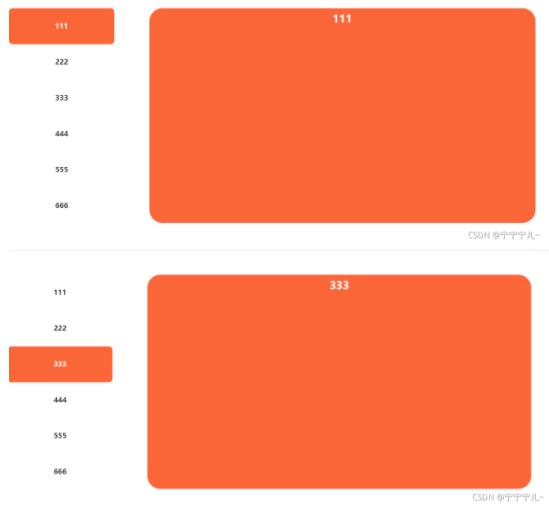
HTML结构部分:
<body>
    <div style="position: relative;margin-top: 56px;display: flex;justify-content: space-between;width: 1200px;" id="left">
        <ul class="gw_b_tab">
            <li class="gw_b_item gw_b_item2">111</li>
            <li class="gw_b_item">222</li>
            <li class="gw_b_item">333</li>
            <li class="gw_b_item">444</li>
            <li class="gw_b_item">555</li>
            <li class="gw_b_item">666</li>
        </ul>
        <div>
            <div class="gw_b_box" style="display: block;">
                <h3 class="gw_box_tit">111</h3>
            </div>
            <div class="gw_b_box" >
                <h3 class="gw_box_tit">222</h3>
            </div>
            <div class="gw_b_box">
                <h3 class="gw_box_tit">333</h3>
            </div>
            <div class="gw_b_box" >
                <h3 class="gw_box_tit">444</h3>
            </div>
            <div class="gw_b_box">
                <h3 class="gw_box_tit">555</h3>
            </div>
            <div class="gw_b_box" >
                <h3 class="gw_box_tit">666</h3>
            </div>
        </div>
</div>
CSS样式定义部分:
*{
            padding: 0;
            margin: 0;
        }
        li{
            list-style: none;
        }
        .gw_b_tab{
    color: #333333;
    width: 240px;
    height: 490px;
    background: #FFFFFF;
    border-radius: 8px;
    overflow: hidden;
    overflow-y: hidden;
}
.gw_b_item{
    height: 82px;
    padding: 0 22px;
    position: relative;
    font-size: 16px;
    line-height: 80px;
    text-align: center;
    cursor: pointer;
    border-radius: 8px;
    font-weight: bold;
    white-space: nowrap;
}
.gw_b_box{
    /* display: none; */
    width: 880px;
    position: absolute;
    right: 0;
    top: 0;
    display: none;
    background: #FB6638;
    height: 490px;
    border-radius: 30px;
}
.gw_b_item2{
    background-color: #FB6638;
    color: #fff;
}
.gw_box_tit{
    height: 48px;
    line-height: 48px;
    font-size: 24px;
    color: #ffffff;
    margin-bottom: 18px;
    text-align: center;
}
JavaScript逻辑处理部分:
<script src="/static/js/jquery-1.11.3.min.js"></script>
<script>
    $(function () {
        $("#left .gw_b_item").click(function () {
            var index = $(this).index();
            $(".gw_b_box").eq(index).show();
            $(this).addClass('gw_b_item2')
            // :eq() 选择器选取带有指定 index 值的元素。
            $(".gw_b_box").eq(index).siblings().hide();
            $(this).siblings().removeClass('gw_b_item2')
        })
    })
</script>
以上即为本文分享的全部内容,希望能为读者的学习提供有益参考,同时也欢迎大家继续支持本站。
作者最新文章
JS中使用位运算(~~)和一元加号(+)快速转换字符串为整数
2026-11-03 22:41:12
怎么使用命令行批量格式化项目中的JS文件
2026-11-03 19:04:42
JS代码美化后报错怎么办?常见格式化冲突解决方法
2026-11-03 18:47:01
不用moment.js,怎么用原生JS Intl API格式化时间戳
2026-11-03 18:10:30
原生JS与dayjs获取当前日期的代码对比
2026-11-03 17:57:26