

JavaScript实现动态网页飘落的雪花效果
本文介绍使用JavaScript实现网页动态雪花飘落效果的完整代码与核心逻辑。通过定义多层雪花、利用Math.sin控制水平摇摆、结合随机数设定大小与位置,并借助setTimeout实现动画循环,展示前端交互特效的具体实现方法。
本文分享一段使用JavaScript实现的动态网页雪花飘落特效代码,供读者参考学习。
设计思路:
1. 创建多个雪花层级,每一层对应一个独立的雪花元素;
2. 雪花的水平左右摇摆运动通过Math.sin()正弦函数计算实现;
3. 雪花的垂直下落运动通过累加位移量实现,每次增加固定的距离;
4. 每个雪花的尺寸大小各不相同,以增强视觉层次感;
实现过程中涉及的关键方法如下:
Math.ceil()方法:返回大于或等于给定数值的最小整数,例如Math.ceil(3.4)的结果为4;
Math.random()方法:返回一个介于0(包含)到1(不包含)之间的随机数;
clientWidth属性:获取元素对象的可视宽度;
clientHeight属性:获取元素对象的可视高度;
setTimeout(“JavaScript语句”,time(单位:毫秒)):该方法接收两个参数,用于设置超时计时器。当执行该方法时开始计时,经过指定的time毫秒后执行传入的JavaScript语句。
完整代码如下:
<html>
<head>
<meta charset="utf-8">
<title>飘落的雪花</title>
</head>
<script language="javascript">
<!--
var snow_size=new Array();
var snow_color=new Array();
var num=50;//雪花数量
var smallest=5;//雪花最小尺寸
var largest=30;//雪花最大尺寸
var dx=new Array();//雪花左右振动幅度大小
var xp=new Array();//水平位置
var yp=new Array();//垂直位置
var am=new Array();
var stx=new Array();//水平位移
var sty=new Array();//垂直位移
var doc_width;
var doc_height;
function makeSize(){//定义每个雪花尺寸
    return smallest+Math.random()*largest;
    }
function makeColor1(){//定义白色雪花
    for(i=0;i<num;++i){
       snow_color[i]='#ffffff';
      }
    }
function makeColor2(){//定义彩色雪花
    for(i=0;i<num;++i){
        A=Math.ceil(Math.random()*255);
        B=Math.ceil(Math.random()*255);
        C=Math.ceil(Math.random()*255);
        snow_color[i]='rgb('+A+','+B+','+C+')';
        }
    }
function init(){//初始化
    doc_width=document.body.clientWidth;
    doc_height=document.body.clientHeight;
    makeColor1();  //白色雪花
    //makeColor2();  //彩色雪花
    for(i=0;i<num;++i){
        dx[i]=0;
        xp[i]=Math.random()*(doc_width-40);
        yp[i]=Math.random()*doc_height;
        am[i]=Math.random()*20;
        snow_size[i]=makeSize();
        stx[i]=0.02+Math.random()/10;
        sty[i]=0.7+Math.random();
        document.write("<div id='snow_"+i+"' style='position:absolute;z-index:eval(30"+i+");visibility:visible;top:15px;left:15px;font-size:"+snow_size[i]+";color:"+snow_color[i]+"'>*</div>");
        }
    }
function snow(){
    for(i=0;i<num;++i){
        yp[i]+=sty[i];
        if(yp[i]>doc_height-50){//如果雪花到达底部
            xp[i]=Math.random()*(doc_width-am[i]-20);
            yp[i]=0;//垂直位置重置为0
            stx[i]=0.02+Math.random()/10;
            sty[i]=0.7+Math.random();
            }
            dx[i]+=stx[i];
            document.getElementById("snow_"+i).style.top=yp[i];
            document.getElementById("snow_"+i).style.left=xp[i]+am[i]*Math.sin(dx[i]);
        }
    setTimeout("snow()",10);//间隔10毫秒调用一次snow函数
    }
//-->
</script>
<body id="myBody" bgcolor="#bbbbbb">
</body>
<script language="javascript">
<!--
init();
snow();
//-->
</script>
</html>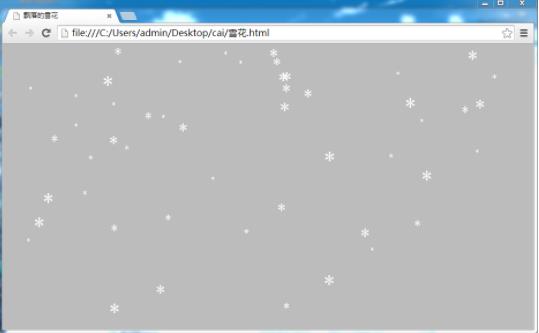
以上就是本文的全部内容,希望对大家的学习有所帮助,也希望大家多多支持本站。
D3.js 比例尺与坐标轴的配置详解
2026-11-05 16:54:46
JavaScript怎么遍历对象的Symbol键和不可枚举属性
2026-11-05 13:13:39
封装一个健壮的JS字符串判空工具函数
2026-11-05 12:16:14
JavaScript合并数组的三种常用方法:concat、扩展运算符与push
2026-11-05 11:22:29
JavaScript立即执行函数(IIFE)是什么及基本语法
2026-11-05 10:51:19