

JS前端图片加载异常兜底方案:从内联到CSS覆盖的完整实践
针对前端图片加载失败导致的体验问题,本文梳理了从内联事件到全局捕获的演进方案。重点探讨了通过重试机制避免死循环、利用CSS伪元素保留原图链接的优化技巧,以及针对背景图的自定义事件处理。此外,还介绍了结合时间戳嗅探与CDN域名切换的超时解决方案,提供了一套完整的前端图片异常处理策略。
背景
网络环境复杂多变,图片可能因网络状况不佳导致加载失败或超时,也可能因权限不足或资源不存在而加载失败。这些问题会严重影响用户体验,因此需要建立一套完善的图片加载异常兜底机制。
<img>加载错误解决方案
内联事件
直接在<img>标签中使用内联事件处理加载失败的情况,虽然直观,但代码侵入性过强,且容易因遗漏导致部分图片无法正确处理。
<img src='xxxxx' onerror="this.src = 'default.png'">
全局img添加事件
鉴于内联方案侵入性过大,我们可以将处理入口收敛,为所有<img>标签统一绑定error事件处理函数,以简化代码管理。
const imgs = document.getElementsByTagName('img')
Array.prototype.forEach.call(imgs, img => {
    img.addEventListener('error', e => {
        e.target.src = 'default.png'
    })
})
利用error事件捕获
为每个<img>单独添加事件处理函数的性能开销较大。我们知道,一般事件会经历以下三个阶段:
- 捕获阶段
- 处于目标阶段
- 冒泡阶段
根据MDN文档描述:
When a resource (such as an <img> or <script>) fails to load, an error event using interface Event is fired at the element that initiated the load, and the onerror() handler on the element is invoked. These error events do not bubble up to window, but can be handled with a EventTarget.addEventListener configured with useCapture set to true.
由此可知,<img>和<script>标签的error事件不会冒泡至window,但会经历捕获阶段和目标阶段。前两种方案利用的是目标阶段触发函数,而本方案则在捕获阶段截获并执行函数,从而减少性能损耗。
document.addEventListener(
    'error',
    e => {
        let target = e.target
        const tagName = target.tagName || ''
        if (tagName.toLowerCase = 'img') {
            target.src = 'default.png'
        }
        target = null
    },
    true
)
替换src方式的最优解
上述方案存在两个主要缺点:
- 若因网络差导致加载失败,默认图片极大概率也会加载失败,从而导致无限循环。
- 若因网络波动导致失败,图片重试后可能成功加载,直接替换src会丢失这一可能性。
因此,我们可以为每个<img>标签额外添加一个data-retry-times计数属性。当重试次数超过限制后,再使用base64图片作为默认兜底,具体实现如下。
document.addEventListener(
    'error',
    e => {
        let target = e.target
        const tagName = target.tagName || ''
        const curTimes = Number(target.dataset.retryTimes) || 0
        if (tagName.toLowerCase() === 'img') {
            if (curTimes >= 3) {
                target.src = 'data:image/png;base64,xxxxxx'
            } else {
                target.dataset.retryTimes = curTimes + 1
                target.src = target.src
            }
        }
        target = null
    },
    true
)
CSS处理的最优解
上述方案通过替换src来展示兜底图,存在一个缺陷:
- 原图的资源链接无法直接从标签上获取(尽管可以通过添加data-xxx属性来hack解决)。
因此,还有一种更优的方式是利用CSS伪元素::before和::after覆盖原本元素,直接展示兜底base64图片,具体样式如下。
CSS样式如下:
img.error {
  display: inline-block;
  transform: scale(1);
  content: '';
  color: transparent;
}
img.error::before {
  content: '';
  position: absolute;
  left: 0; top: 0;
  width: 100%; height: 100%;
  background: #f5f5f5 url(data:image/png;base64,xxxxxx) no-repeat center / 50% 50%;
}
img.error::after {
  content: attr(alt);
  position: absolute;
  left: 0; bottom: 0;
  width: 100%;
  line-height: 2;
  background-color: rgba(0,0,0,.5);
  color: white;
  font-size: 12px;
  text-align: center;
  white-space: nowrap;
  overflow: hidden;
  text-overflow: ellipsis;
}
JS代码如下:
document.addEventListener(
    'error',
    e => {
        let target = e.target
        const tagName = target.tagName || ''
        const curTimes = Number(target.dataset.retryTimes) || 0
        if (tagName.toLowerCase() === 'img') {
            if (curTimes >= 3) {
                target.classList.remove('error')
                target.classList.add('error')
            } else {
                target.dataset.retryTimes = curTimes + 1
                target.src = target.src
            }
        }
        target = null
    },
    true
)
<img>加载超时解决方案
目前大多数应用都会接入CDN来加速资源请求,但CDN存在节点覆盖不全的问题,可能导致DNS查询超时。此时,如果切换Domain可能就会加载成功。
嗅探切换Domain(CNAME)
我们可以使用嗅探的方式,测试CDN提供的Domain是否能够正常访问,如果不行或者超时就及时切换成可访问Domain。其中有几个注意点:
- 为了防止嗅探图片缓存,需要添加时间戳保持新鲜度
- Image图片加载没有超时机制,使用setTimeout模拟超时
// 防止嗅探图片存在缓存,添加时间戳保持新鲜度
export const imgUri = `/img/xxxxx?timestamp=${Date.now()}${Math.random()}`;

export const originDomain = 'https://sf6-xxxx.xxxx.com'

// 可采用配置下发的方式
export const cdnDomains = [
  'https://sf1-xxxx.xxxx.com',
  'https://sf3-xxxx.xxxx.com',
  'https://sf9-xxxx.xxxx.com',
];

export const validateImageUrl = (url: string) => {
  return new Promise<string>((resolve, reject) => {
    const img = new Image();
    img.onload = () => {
      resolve(url);
    };
    img.onerror = (e: string | Event) => {
      reject(e);
    };
    // promise的状态不可变性,使用setTimeout模拟超时
    const timer = setTimeout(() => {
      clearTimeout(timer);
      reject(new Error('Image Load Timeout'));
    }, 10000);
    img.src = url;
  });
};

export const setCDNDomain = () => {
  const cdnLoop = () => {
    return Promise.race(
      cdnDomains.map((domain: string) => validateImageUrl(domain + imgUri)),
    ).then(url => {
      window.shouldReplaceDomain = true;
      const urlHost = url.split('/')[2];
      window.replaceDomain = urlHost;
    });
  };

  return validateImageUrl(`${originDomain}${imgUri}`)
    .then(() => {
      window.shouldReplaceDomain = false;
      window.replaceDomain = '';
    })
    .catch(() => {
      return cdnLoop();
    });
};

// 替换URL
export const replaceImgDomain = (src: string) => {
  if (src && window.shouldReplaceDomain && window.replaceDomain) {
    return src.replace(originDomain.split('/')[2], window.replaceDomain);
  }
  return src;
};
服务端下发Domain(CNAME)
该方案需要后台同学配合,由后台判断当前可用Domain并返回。
getUsefulDomain()
    .then(e => {
        window.imgDomain = e.data.imgDomain || ''
    })
background-image加载异常解决方案
实际应用中背景图也会加载失败,通常这些元素没有error事件,所以也就无从捕获error事件了。此时就可以利用dispatchEvent,它同样拥有捕获阶段,MDN文档上是这么介绍的:
Dispatches an Event at the specified EventTarget, (synchronously) invoking the affected EventListeners in the appropriate order. The normal event processing rules (including the capturing and optional bubbling phase) also apply to events dispatched manually with dispatchEvent().
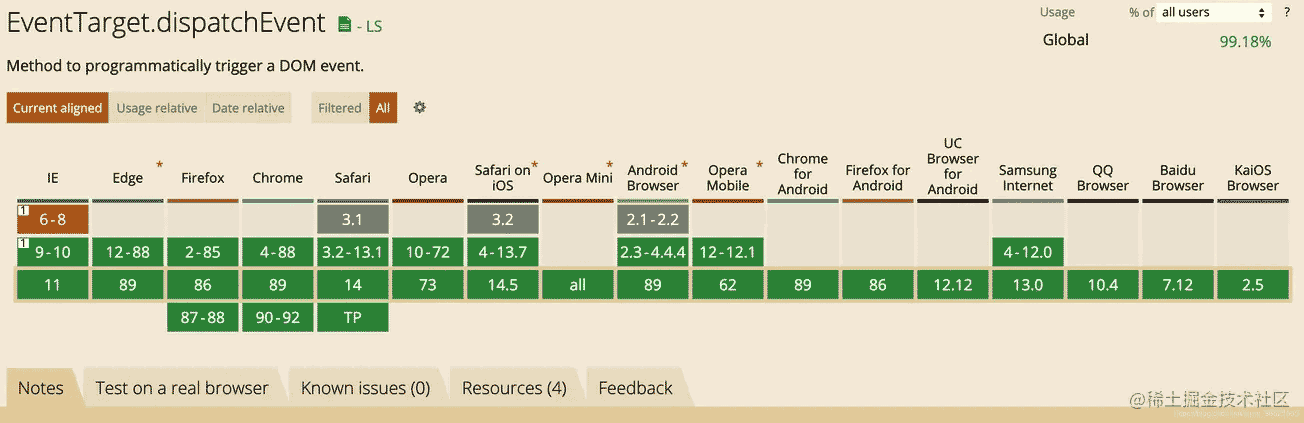
可以看到支持度也还是可以的,我们首先需要自定义一个事件并初始化这个事件,在背景图加载失败的时候触发这个自定义事件,最后在上层捕获这个事件并执行事件函数。
自定义事件
自定义事件有两种方式:
- 使用createEvent() 和 initEvent(),但是根据MDN文档,initEvent方法已经从浏览器标准中移除,并不安全,但支持度很高。
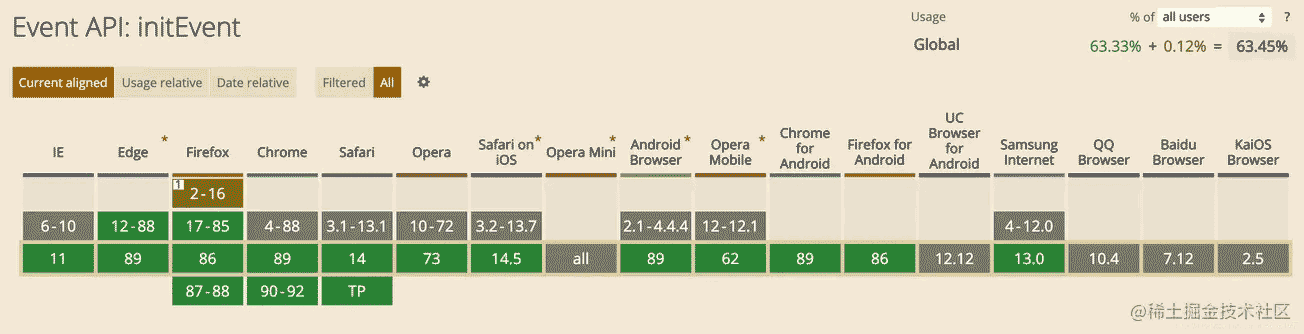
- 使用new Event()的方式,但是支持率稍微差一点
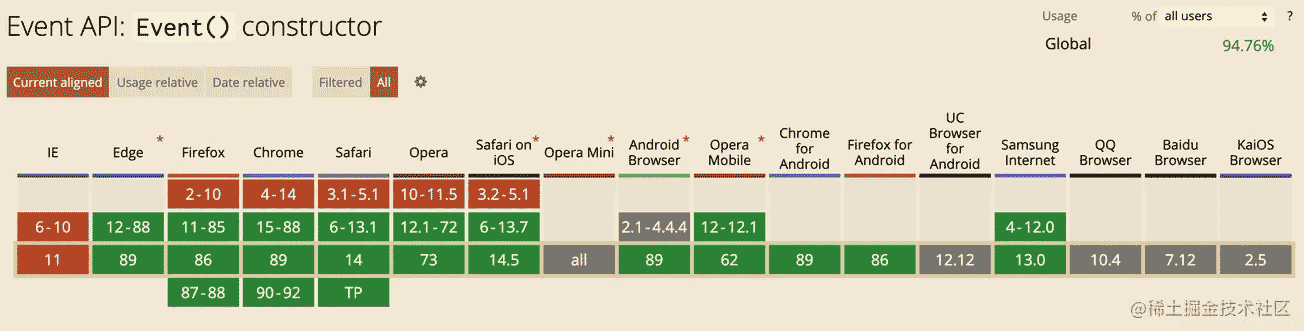
这里以第二种为例,根据MDN文档的用法创建一个自定义事件:
const event = new Event('bgImgError')
嗅探加载情况
使用前面定义的方法嗅探图片资源的情况。
validateImageUrl('xxx.png')
    .catch(e => {
        let ele = document.getElementById('bg-img')
        if (ele) {
            ele.dispatchEvent('bgImgError')
        }
        ele = null
    })
添加事件捕获
document.addEventListener(
    'bgImgError',
    e => {
        e.target.style.backgroundImage = "url(data:image/png;base64,xxxxxx)"
    },
    true
)
CDN与DNS知识汇总
图片加载失败后CSS样式处理最佳实践
优雅的处理图片异常
以上就是js前端图片加载异常兜底方案的详细内容,更多关于js前端图片加载异常方案的资料请关注本站其它相关文章!
crypto-js 处理 Base64 和 Hex 编码转换的正确姿势
2026-11-05 16:39:11
ammo.js 内存管理:避免 Wasm 环境下的内存泄漏技巧
2026-11-05 10:21:09
JS几种补零方法的性能对比与选择建议
2026-11-04 21:17:50
JS数组去重最佳实践:Set、filter与reduce实现方案
2026-11-04 10:57:15
基准元素选择策略对 JavaScript 快速排序性能的影响
2026-11-03 22:37:29