

react-router-dom v6 利用 Outlet 实现 KeepAlive 缓存方案
本文介绍在 react-router-dom v6 中如何利用 Outlet 组件结合 React Transition Group 实现页面缓存(KeepAlive)功能。通过自定义 KeepAlive 组件管理组件实例 Map,并配合 CSS 过渡动画,实现特定标签页的数据缓存与路由切换的渐隐渐显效果。
react-router-dom v6 Outlet KeepAlive 实现方案
本文详细讲解如何在 react-router-dom v6 环境下,借助 Outlet 组件来实现页面缓存(KeepAlive)功能。
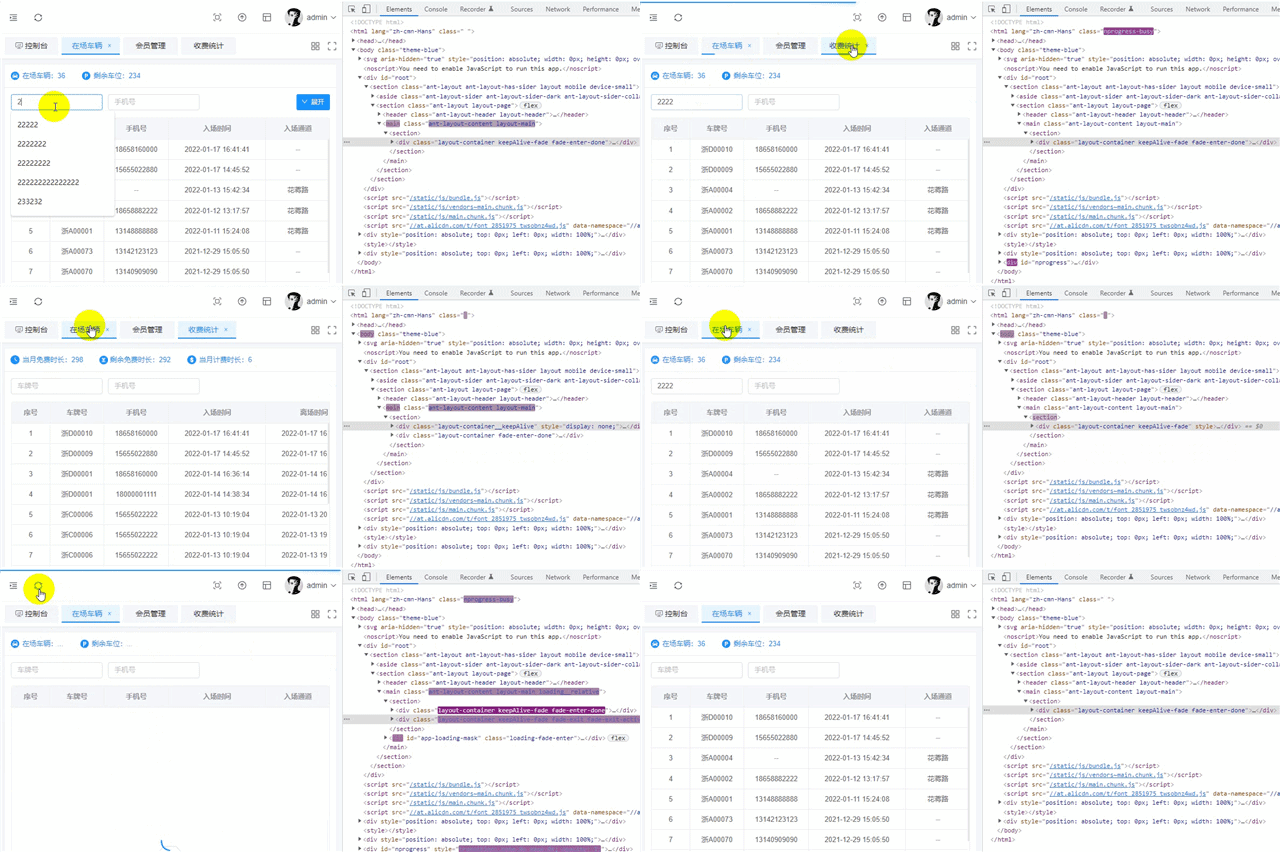
以下是 KeepAlive 组件的核心代码实现:
KeepAlive 组件代码实现
import React, { useRef, useEffect, useReducer, useMemo, memo } from 'react'
import { TransitionGroup, CSSTransition } from 'react-transition-group'
import { useLocation } from 'react-router-dom'

const KeepAlive = props => {
    const { include, keys, children } = props
    const { pathname } = useLocation()
    const componentList = useRef(new Map())
    const forceUpdate = useReducer(bool => !bool)[1] // 强制渲染
    const cacheKey = useMemo(() => pathname + "__" + keys[pathname], [pathname, keys]) // eslint-disable-line
    const activeKey = useRef(null)

    useEffect(() => {
        componentList.current.forEach(function(value, key) {
            const _key = key.split("__")[0]
            if (!include.includes(_key) || (_key === pathname)) {
                this.delete(key)
            }
        }, componentList.current)

        activeKey.current = cacheKey
        if (!componentList.current.has(activeKey.current)) {
            componentList.current.set(activeKey.current, children)
        }
        forceUpdate()
    }, [cacheKey, include]) // eslint-disable-line

    return (
        <TransitionGroup component={ null }>
            {
                Array.from(componentList.current).map(([key, component]) =>
                    <CSSTransition
                        key={ key }
                        appear={ true }
                        timeout={ 500 }
                        classNames='fade'>
                        {
                            key === activeKey.current ?
                            <div
                                className={
                                    `layout-container${include.includes(key.split("__")[0]) ? " keep-alive-fade": ""}`
                                }>
                                { component }
                            </div> :
                            <div
                                className='layout-container__keep-alive'
                                style={{ display: 'none' }}>
                                { component }
                            </div>
                        }
                    </CSSTransition>
                )
            }
        </TransitionGroup>
    )
}

export default memo(KeepAlive)
在 main.js 文件中调用该组件。
Main 组件调用与配置
import PropTypes from 'prop-types'
import { useLocation, useOutlet } from 'react-router-dom'
import { connect } from 'react-redux'
import { Layout } from 'antd'
import { TransitionGroup, CSSTransition } from 'react-transition-group'
import KeepAlive from '@/components/common/keepAlive'
import { isKeepAlive } from '@/service/config'

const Main = props => {
    const { fullScreen, cacheRoutes, cacheKeys } = props
    const outlet = useOutlet()
    const { pathname } = useLocation()

    return (
        <Layout.Content className={{ "layout-main": true, "full-screen": fullScreen }}>
            <section>
                {
                	// isKeepAlive 生产环境中启用缓存
                    isKeepAlive ?
                    <KeepAlive include={ cacheRoutes } keys={ cacheKeys }>
                        { outlet } // 此处不能用 <Outlet /> 不然无法通过 useRef 来缓存
                    </KeepAlive> :
                    <TransitionGroup component={ null }>
                        <CSSTransition
                            key={ pathname + cacheKeys[pathname] }
                            appear={ true }
                            timeout={ 500 }
                            classNames='page-fade'>
                            { outlet } // 此处不能用 <Outlet /> 会造成路由切换时,组件重复渲染
                        </CSSTransition>
                    </TransitionGroup>
                }
            </section>
        </Layout.Content>
    )
}

Main.propTypes = {
    fullScreen: PropTypes.bool,
    cacheRoutes: PropTypes.array,
    cacheKeys: PropTypes.object
}

const mapStateToProps = state => {
    return {
        fullScreen: state.setting.fullScreen,
        cacheRoutes: state.tabsBar.cacheRoutes, // 需要缓存的路由组件path数组
        cacheKeys: state.tabsBar.cacheKeys // 用于组件局部刷新
    }
}

export default connect(mapStateToProps)(Main)
从当前图片动画演示中可以观察到,仅对第二个标签页启用了缓存,其余标签页未开启。因此,切换回第二个标签页时不会重新请求数据,而其他标签页每次进入都会重新发起数据请求。此外,本文还结合了 react-transition-group 实现了路由切换时的渐隐渐显动画,但需注意这需要手动配合 CSS 样式进行控制,无法完全依赖 CSSTransition 组件。相关代码片段如下:
路由切换动画样式
// 路由进入动画
.fade-enter, .fade-appear {
    opacity: 0;
}
.fade-enter-active, .fade-appear-active {
    opacity: 1;
    @include transition(opacity .25s cubic-bezier(.645, .045, .355, 1) .25s);
}
.fade-exit {
    opacity: 1;
    z-index: 1;
}
.fade-exit-active {
    opacity: 0;
    z-index: 1;
    @include transition(opacity .25s cubic-bezier(.645, .045, .355, 1));
}
.page-fade-enter, .page-fade-appear {
    opacity: 0;
}
.page-fade-enter-active, .page-fade-appear-active {
    opacity: 1;
    @include transition(opacity .5s cubic-bezier(.645, .045, .355, 1));
}
.page-fade-exit {
    opacity: 1;
    display: none!important;
}
.page-fade-exit-active {
    opacity: 0;
}
@keyframes keepAliveFade {
  0% { opacity: 0; }
  50% { opacity: 0; }
  100% { opacity: 1; }
}
.layout-container {
    position: absolute;
    left: 0;
    right: 0;
    top: 0;
    bottom: 0;
    &.keep-alive-fade { animation: keepAliveFade .5s ease-in-out; }
}
至此,关于 react-router-dom v6 通过 Outlet 实现 KeepAlive 功能的介绍已完成。如需了解更多 react KeepAlive 相关内容,建议搜索本站过往文章或继续阅读后续相关文章,感谢大家的支持。
JavaScript将图片转换为Base64编码的两种途径
2026-11-05 16:43:05
怎么在 Vue 或 React 项目中正确集成 animate.js
2026-11-05 10:23:38
JS注册事件:addEventListener基础语法与参数详解
2026-11-05 08:44:56
JSP和JS的区别:运行环境与服务端/客户端职责解析
2026-11-04 23:34:36
pdf.js 官方下载地址:GitHub Release 获取预编译包
2026-11-04 23:07:27