

使用JavaScript实现简易抽奖系统
作者:小括号时间:2026-10-24 23:57:03浏览:619
本文介绍如何使用JavaScript编写一个简单的网页抽奖系统。通过HTML表格展示奖品,利用CSS实现文字闪烁特效,并结合定时器与事件监听实现点击开始/结束按钮控制抽奖流程。代码包含完整的HTML结构、样式定义及核心逻辑,适合前端初学者参考学习。
JavaScript简易抽奖系统实现
以下展示一个基于JavaScript编写的简易抽奖系统示例,供开发者参考。
运行效果如截图所示:奖品文字带有闪烁动画,点击“开始”按钮即可启动抽奖,此时按钮文字切换为“结束”;再次点击“结束”按钮,抽奖停止并显示中奖结果。
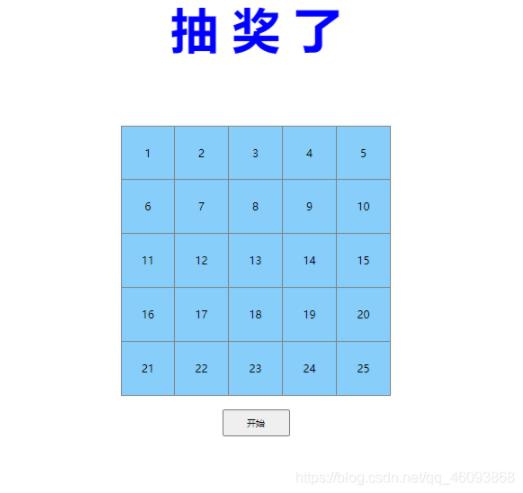
具体实现代码如下:
<!DOCTYPE html>
<html>

    <head>
        <meta charset="UTF-8">
        <title>抽奖</title>
        <style type="text/css">
            table {
                width: 400px;
                height: 400px;
                border: gray solid 1px;
                border-collapse: collapse;
                text-align: center;
                margin: 0 auto;
                margin-top: 100px;
            }

            .td {
                border: gray solid 1px;
                background-color: lightskyblue;
            }

            .td1 {
                border: gray solid 1px;
                background-color: red;
            }

            td:hover {
                background-color: cornflowerblue;
            }

            div {
                width: 100px;
                height: 40px;
                margin-left: auto;
                margin-right: auto;
                margin-top: 20px;
            }

            #btn {
                width: 100px;
                height: 40px;
            }
            #blink{
                width: 300px;
                height: 90px;
                margin-left: auto;
                margin-right: auto;
                margin-top: 20px;
                font-size: 70px;
                font: "微软雅黑";
                text-align: center;
                font-weight: bold;
            }

        </style>
    </head>

    <body>
        <div id="blink">
            抽  奖 了
        </div>
        <table>
        </table>
        <div>
            <input type="button" id="btn" value="开始" onclick="click1()" />
        </div>

    </body>
    <script type="text/javascript">
        /*利用二维数据+dom操作*/
        var interval = 0;
        var table = document.querySelector("table");
        var arr = [
            [1, 2, 3, 4, 5],
            [6, 7, 8, 9, 10],
            [11, 12, 13, 14, 15],
            [16, 17, 18, 19, 20],
            [21, 22, 23, 24, 25]
        ]
        for(var i in arr) {
            var tr = table.insertRow();
            for(var j in arr[i]) {
                var td = tr.insertCell();
                td.setAttribute("class", "td");
                td.innerHTML = arr[i][j];
            }
        }
        //获取所有的td标签数组
        var count = document.querySelectorAll("td");

        function click1() {
            //找到当前按钮
            var btn = document.querySelector("#btn");
            //判断按钮状态
            if(btn.value == '开始') {
                //点解后修改背景颜色
                btn.style.backgroundColor = "red";
                //修改按钮文字
                btn.value = "结束";
                //停止继续调用setInterval函数进行抽奖
                clearInterval(interval);
                interval = setInterval(function() {
                    var rad = Math.floor(Math.random() * 25);
                    for(var i = 0; i < count.length; i++) {
                        //通过遍历来重新给表设置样式
                        count[i].setAttribute("class", "td");
                        if(rad === i) {
                            //给抽到的人改变样式
                            count[i].setAttribute('class', 'td1');
                        }
                    }
                }, 100)

            } else {
                //设置背景颜色
                btn.style.backgroundColor = "gainsboro";
                //修改按钮文字
                btn.value = "开始";
                clearInterval(interval);
            }
        }

        function changeColor() {
            var color = "#f00|#0f0|#00f|#880|#808|#088|yellow|green|blue|gray";
            color = color.split("|");
            document.getElementById("blink").style.color = color[parseInt(Math.random() * color.length)];
        }
        setInterval("changeColor()", 200);
    </script>

</html>
以上就是本文的全部内容,希望对大家的学习有所帮助,也希望大家多多支持本站。
作者最新文章
JS语法错误会阻止加载吗?区分SyntaxError与资源加载失败
2026-11-05 16:08:46
JavaScript常见SyntaxError语法错误排查与修复方法
2026-11-05 13:58:44
JS中slice、substring和substr截取字符串的区别
2026-11-05 13:43:47
JS 转 TS 手动迁移最佳实践:从配置 tsconfig 到消除 any 类型
2026-11-05 11:53:32
为什么JS数组push后得到的是数字而不是数组?
2026-11-05 09:59:18