

原生JavaScript实现简易网页计算器
作者:闭包旅人时间:2026-10-24 17:53:00浏览:572
本文介绍如何使用原生JavaScript、HTML5和CSS3构建一个简易的网页版计算器。内容涵盖基础样式布局、HTML结构搭建以及核心JS逻辑实现,包括数字输入、运算符处理及结果显示功能,适合前端初学者参考学习。
网页计算器实现概述
本文分享了一个使用JavaScript编写的网页版计算器示例代码,供读者参考学习。
作者因查看系统自带计算器功能而受到启发,编写了此网页版计算器。该版本具备基本计算功能,虽未涵盖所有高级特性,但可作为学习参考。
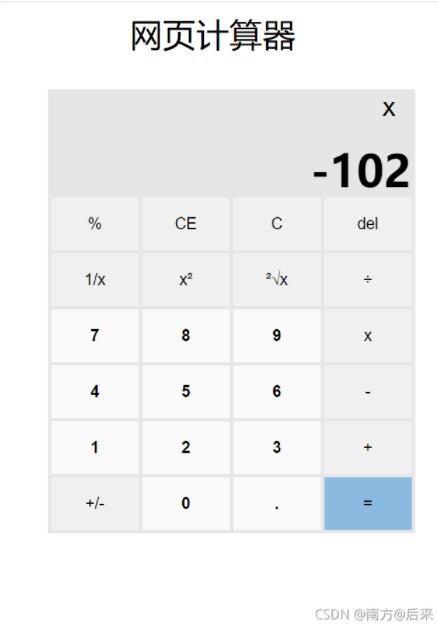
界面样式与结构
首先提供网页计算器的样式代码,用户可直接复制使用以快速构建界面。
<!DOCTYPE html>
<html lang="zh-CN">
<head>
<meta charset="UTF-8">
<meta http-equiv="X-UA-Compatible" content="IE=edge">
<meta name="viewport" content="width=device-width, initial-scale=1.0">
<title>Document</title>
<style>
* {
margin: 0;
padding: 0;
box-sizing: border-box;
}
.cal {
width: 420px;
margin: 100px auto;
background-color: #E6E6E6;
padding: 2px;
overflow: hidden;
}
.show {
position: relative;
width: 416px;
height: 120px;
font-size: 50px;
line-height: 50px;
font-weight: 700;
}
.show button {
display: none;
position: absolute;
top: -2px;
right: -2px;
width: 60px;
height: 40px;
line-height: 40px;
text-align: center;
border: transparent;
background-color: #E6E6E6;
font-size: 30px;
font-weight: 100;
cursor: pointer;
}
.show button:hover {
background-color: #e81123;
color: #f0f0f0
}
.res,
.left,
.right {
position: absolute;
bottom: 0;
height: 60px;
line-height: 60px;
padding: 0 3px;
}
.res {
right: 0;
/* width: 100%; */
text-align: right;
}
.left {
display: none;
background-color: #E6E6E6;
}
.right {
display: none;
right: 0;
background-color: #E6E6E6;
}
.left:hover,
.right:hover {
color: #2e8eda;
}
.keyboard {
display: flex;
flex-wrap: wrap;
justify-content: center;
}
.btn {
display: flex;
justify-content: center;
width: 100px;
height: 60px;
line-height: 60px;
margin: 2px;
background-color: #f0f0f0;
border: transparent;
font-size: large;
}
.btn:hover {
background-color: #d6d6d6;
}
.digital {
background-color: #fafafa;
font-weight: 700;
}
.equal {
background-color: #8abae0;
}
.equal:hover {
background-color: #4599db;
}
</style>
</head>
<body>
<div class="cal">
<div class="show">
<button class="close">×</button>
<div class="res">0</div>
<div class="left"><</div>
<div class="right">></div>
</div>
<div class="keyboard">
<!-- 0 -->
<button class="btn percent">%</button>
<!-- 1 -->
<button class="btn clearOne">CE</button>
<!-- 2 -->
<button class="btn clearAll">C</button>
<!-- 3 -->
<button class="btn back">del</button>
<!-- 4 -->
<button class="btn div1">1/x</button>
<!-- 5 -->
<button class="btn square">x²</button>
<!-- 6 -->
<button class="btn sqrt">²√x</button>
<!-- 7 -->
<button class="btn div">÷</button>
<!-- 8 -->
<button class="btn digital">7</button>
<!-- 9 -->
<button class="btn digital">8</button>
<!-- 10 -->
<button class="btn digital">9</button>
<!-- 11 -->
<button class="btn mul">x</button>
<!-- 12 -->
<button class="btn digital">4</button>
<!-- 13 -->
<button class="btn digital">5</button>
<!-- 14 -->
<button class="btn digital">6</button>
<!-- 15 -->
<button class="btn sub">-</button>
<!-- 16 -->
<button class="btn digital">1</button>
<!-- 17 -->
<button class="btn digital">2</button>
<!-- 18 -->
<button class="btn digital">3</button>
<!-- 19 -->
<button class="btn add">+</button>
<!-- 20 -->
<button class="btn neg">+/-</button>
<!-- 21 -->
<button class="btn digital">0</button>
<!-- 22 -->
<button class="btn digital">.</button>
<!-- 23 -->
<button class="btn equal">=</button>
</div>
</div>
<script src="./计算机.js"></script>
</body>
</html>核心逻辑实现
接下来是JavaScript核心逻辑部分的代码实现。
const bt = document.querySelectorAll('.keyboard button')
const close = document.querySelector('.close')
const res = document.querySelector('.res')
//当点击的数字的时候
let k = 0
let one
let two
function arr(num) {
    bt[num].onclick = function () {
        res.innerText += bt[num].innerText
        res.innerText = parseFloat(res.innerText)
        // console.log(one)

    }
}
//小数点
//保留结果小数
function fn() {
    if (res.innerText.length > 8) {
        res.innerText = res.innerText.slice(0, 10)
    }
    if (res.innerText == 'NaN') {
        res.innerText = 0
    }

}

//当点击的是运算符号的时候
function symbol(str, fu) {
    bt[str].onclick = function () {
        k++
        if (k > 1) {
            return
        }
        one = parseFloat(res.innerText)
        // switch (fu) {
        //     case '+':
        //         one += one
        //         break;
        //     case '-':
        //         one -= one
        //         break;
        //     case '*':
        //         one *= one
        //         break;
        //     case '/':
        //         one /= one
        //         break;
        // }
        res.innerText = ''
        close.style.display = 'block'
        close.innerText = bt[str].innerText
        console.log(one)
    }
}

arr(21)
arr(18)
arr(17)
arr(16)
arr(14)
arr(13)
arr(12)
arr(10)
arr(9)
arr(8)
arr(22)
//运算符号
symbol(0)
symbol(7, '/')
symbol(11, '*')
symbol(15, '-')
symbol(19, '+')
console.log(bt[22].innerText)
bt[22].onclick = function () {
    res.innerText += bt[22].innerText
    console.log(565)
}
bt[23].onclick = function () {
    two = parseFloat(res.innerText)
    switch (close.innerText) {
        case '%':
            //toFixed(11)保留11位小数
            res.innerText = one % two
            k = 0
            break;
        case '+':
            res.innerText = one + two
            k = 0
            break;
        case '-':
            res.innerText = one - two
            k = 0
            break;
        case 'x':
            res.innerText = one * two
            k = 0
            break;
        case '÷':
            res.innerText = one / two
            k = 0
            break;
    }
    // console.log(res.innerText.length)
    fn()


}
bt[1].onclick = function () {
    res.innerText = ''
}
bt[2].onclick = function () {
    res.innerText = '0'
    close.innerText = 'x'
    close.style.display = ''
    one = 0
    two = 0
}
bt[3].onclick = function () {
    res.innerText = res.innerText.slice(0, res.innerText.length - 1)
    if (res.innerText.length === 0) {
        res.innerText = '0'
        return
    }
}
bt[4].onclick = function () {
    res.innerText = 1 / parseFloat(res.innerText)
    fn()
}
bt[5].onclick = function () {
    res.innerText = parseFloat(res.innerText) * parseFloat(res.innerText)
    fn()
}

bt[6].onclick = function () {
    res.innerText = Math.sqrt(parseFloat(res.innerText))
    fn()
}
bt[20].onclick = function () {
    res.innerText = 0 - parseFloat(res.innerText)
    fn()
}
通过上述代码,一个简单的计算器功能即告完成。希望此示例能对读者的学习有所帮助,同时也感谢大家的支持。
作者最新文章
什么时候该用JS构造器:与工厂模式、字面量的选择对比
2026-11-05 16:18:22
推荐几款轻量级JS照片墙开源库及对比
2026-11-05 15:56:19
JavaScript递归写法有哪些常见陷阱及避免方法
2026-11-05 14:53:38
JS数组浅拷贝与深拷贝怎么选?场景与方法总结
2026-11-05 14:41:02
p5.js 中 setup() 和 draw() 函数的执行机制详解
2026-11-05 12:32:38