Vue实现瀑布流布局与滚动触底动态加载
作者:南栀时间:2026-10-24 15:51:47浏览:632
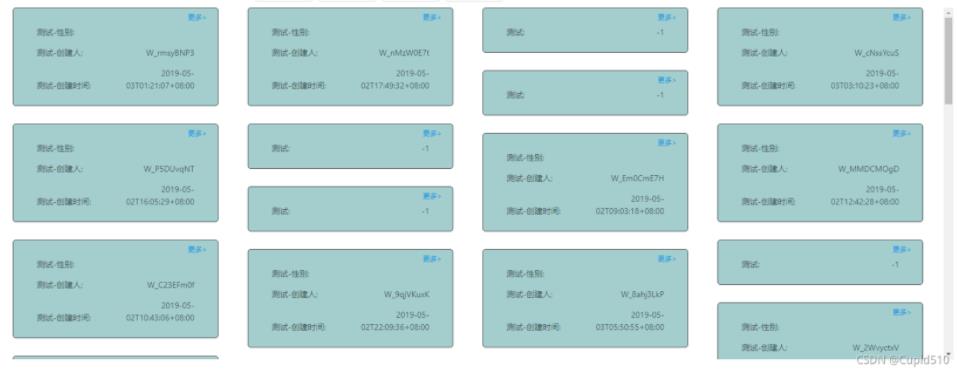
本文介绍在Vue环境中实现瀑布流布局及滚动触底加载数据的方法。通过监听滚动事件判断是否触底,触发接口获取下一页数据,并重新计算各列高度以维持瀑布流视觉效果。
Vue瀑布流布局与滚动加载实现
本文分享一个基于JavaScript和Vue实现瀑布流布局及触底动态加载数据的具体代码示例,供读者参考学习。
// onScrollEvent 滚动条事件
<div class="box" ref="box" @mousewheel="onScrollEvent">
    //每一个方块内的内容start
      <div class="boxItemStyle" v-for="(userTag, i) in dataSource" :key="i" ref="boxItemStyle">
        <a-tag class="moreStyle" @click="more(userTag.primaryParam)"> 更多></a-tag>
        <div v-for="item in userTag.userTag" :key="item.code">
          <p>
            <span style="text-align: left"> {{ item.name }}:</span>
            <span style="text-align: right">{{ item.value }}</span>
          </p>
        </div>
      </div>
      //每一个方块内的内容end
</div>
瀑布流布局实现
waterFall () {
  //减去边距的宽度
      var pageWidth = this.$refs.box.offsetWidth - 200
      var columns = 4; //定义一行4列
      var itemWidth = parseInt(pageWidth / columns);
      var arr = [];
      var nodes = document.getElementsByClassName("boxItemStyle")
      setTimeout(() => {
        //var node1 = Array.from(nodes)
       // var node2 = Array.prototype.slice.call(nodes)
        for (var i = 0; i < nodes.length; i++) {
          nodes[i].style.width = itemWidth + "px"
          if (i < columns) {
            nodes[i].style.width = itemWidth + "px"
            nodes[i].style.left = itemWidth * i + i * 50 + "px"
            nodes[i].style.top = 0
            arr.push(nodes[i].offsetHeight);
          } else {
            // 找到数组中最小高度  和 它的索引
            var minHeight = arr[0];
            var index = 0;
            for (var j = 0; j < arr.length; j++) {
              if (minHeight > arr[j]) {
                minHeight = arr[j];
                index = j;
              }
            }
            nodes[i].style.top = arr[index] + 30 + "px",
              nodes[i].style.left = nodes[index].offsetLeft + 'px';
            //  修改最小列的高度
            // 最小列的高度 = 当前自己的高度 + 拼接过来的高度
            arr[index] = arr[index] + nodes[i].offsetHeight + 30;//设置30的距离
          }
        }
      }, 1000)
    },
动态加载数据逻辑
onScrollEvent () {
      if (
        this.isScroll &&
        this.$refs.box.scrollHeight - this.$refs.box.scrollTop -this.$refs.box.clientHeight <= 0
      ) {
        this.loading = true
        if (this.ipagination.current == 1) {
          this.ipagination.current += 1
        }
        let param = {}
        param['pageNo'] = this.ipagination.current
        param['pageSize'] = this.ipagination.pageSize
        param['portraitId'] = this.portraitId
        postAction(this.url.list, { ...param }).then((res) => {
          this.loading = false
          if (res.success) {
            this.isScroll = res.records
            this.dataSource = this.dataSource.concat(res.result.records || res.result)
            this.waterFall();
          }
        })
        this.ipagination.current++
      }
    },
以上即为该功能的核心实现内容,希望能为相关开发工作提供借鉴。
作者最新文章
怎么在React或Vue前端中使用Cube.js Client获取数据
2026-11-03 09:24:09
Vue.js 新手入门:怎么使用 Vite 快速搭建第一个项目
2026-11-02 10:30:55
Vue 项目中封装 heatmap.js:生命周期管理与内存释放
2026-11-02 09:17:40
uni-app 自定义组件开发与通信机制详解
2026-11-01 02:03:46
Vue.js 项目中 Mock 数据的三种实现方案
2026-10-31 17:23:18