

原生JS面向对象实现打字小游戏
作者:半夏时间:2026-10-24 15:37:10浏览:309
本文介绍使用原生JavaScript面向对象方法实现的打字小游戏。游戏通过键盘输入匹配下落小球上的数字,每五个球后速度加快,小球属性随机。代码可直接嵌入HTML文件运行,适合课设参考,并提供了后续优化建议。
本文分享了一个使用JavaScript面向对象技术实现的打字小游戏完整代码,供读者参考学习。
Demo介绍
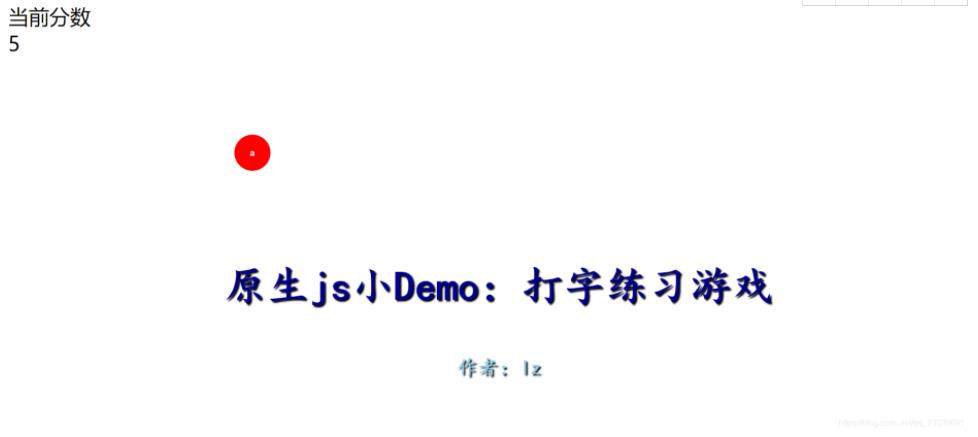
游戏机制要求玩家通过键盘输入下落小球上显示的数字。小球会在屏幕任意位置随机刷新,其大小和颜色也均为随机生成。每成功处理五个小球后,小球的掉落速度会加快。该实现采用面向对象class方法编写,源码可直接复制并保存为HTML文件运行,适用于学校课程设计项目。
源码
<!DOCTYPE html>
<html lang="en">

<head>
    <meta charset="UTF-8">
    <meta http-equiv="X-UA-Compatible" content="IE=edge">
    <meta name="viewport" content="width=device-width, initial-scale=1.0">
    <title>Document</title>
</head>
<style>
    .title{
        width: 1200px;
        height: 80px;
        margin:400px auto;
        color: darkblue;
        text-shadow: 3px 3px 3px black;
        font-size: 80px;
        font-weight: bolder;
        text-align: center;
        font-family: "楷体";

    }
    .name{
        width: 1000px;
        height: 40px;
        margin:0 auto;
        color: skyblue;
        text-shadow: 3px 3px 3px black;
        font-size: 40px;
        font-weight: bolder;
        text-align: center;
        font-family: "楷体";
    }
</style>

<body>
    <div style="font-size: 40px;">当前分数<div class="score" >0</div></div>
    <div class="title">原生js小Demo:打字练习游戏</div>
    <div class="name">作者:lz</div>
</body>
<script>
    class TypingGame {
        constructor() {
            this.oSpan
            this.speed = 2;
            this.timer = "";
            this.word;
            this.colors = ["red", "orange", "purple", "black", "pink", "blue", "skyblue", "yellowgreen", "brown", "tomato", "indianred", "orchid", "peru", "aqua", "slateblue", "gray", "grey", "crimson","green"]//颜色集合
            this.createWord(this.speed);
            document.onkeydown = e => {
                var e = e || window.event;
                var keycode = e.keyCode || e.which;
                // TypingGame.oSpan=this.$$("span");
                var keyword = String.fromCharCode(keycode).
                    toLowerCase()
                if (this.word === keyword) {
                    // 打掉一个 - 计分
                    // 获取原来的分
                    var score = this.$('.score', false).innerText - 0
                    // 让分数+1
                    score++
                    // 加1以后的分数放进div中
                    document.querySelector('.score').innerText = score
                    if (score === 5) {
                        this.speed += 2//每过五个字母,下落速度加快
                    }
                    this.oSpan.parentElement.removeChild(this.oSpan)
                    this.createWord(this.speed)
                }
            }


        }
        createWord(speed) {
            let wh=this.getRandom(30,80);//随机大小
            this.oSpan = this.creEle('span');
            //    console.log(this.oSpan)
            this.setStyle(this.oSpan, {
                width: wh+"px",
                height: wh+"px",
                position: 'absolute',
                top: 0,
                left: this.getRandom(document.documentElement.clientWidth - 30) + "px",
                borderRadius: "50%",
                lineHeight: '30px',
                textAlign: 'center',
                backgroundColor: this.colors[this.getRandom(18)],
                color: "white",
                fontWeight: "bold",
                textAlign:"center",
                lineHeight:wh+"px"
            })

            document.body.appendChild(this.oSpan)
            // 随机字符:97~122
            var randomNum = this.getRandom(97, 123)
            this.word = String.fromCharCode(randomNum);

            this.oSpan.innerText = this.word
            // 这个标签要慢慢向下运动
            this.elementsMove(this.speed);
        }
        elementsMove() {
            // console.log(this.oSpan)
            // 定时器
            clearInterval(this.timer)
            this.timer = setInterval(() => {
                // 获取高度

                var t = this.oSpan.offsetTop;
                // 加大高度
                t += this.speed;
                console.log(this.speed)
                // 如果这个标签到了浏览器的最低端,GAME OVER
                if (t >= document.documentElement.clientHeight - 30) {
                    clearInterval(this.timer)
                    if (confirm("GAME OVER, 是否重玩?")) {
                        location.reload();//刷新重玩
                    }
                }
                // 加大后设置给标签的top
                this.oSpan.style.top = t + "px"
            }, 50)
        }
        setStyle(ele, styleObj) {
            for (var attr in styleObj) {
                ele.style[attr] = styleObj[attr]
            }
        }
        $(tag, all = false) {
            return all ? document.querySelectorAll(tag) : document.querySelector(tag);
        }
        creEle(tag) {
            return document.createElement(tag)
        }
        getRandom(a, b = 0) {
            var max = Math.max(a, b);
            var min = Math.min(a, b)
            return Math.floor(Math.random() * (max - min)) + min
        }
    }
    new TypingGame;
</script>

</html>
Demo截图
还可以改进的地方
开发者可自行进行二次开发,例如增加输入错误的提示功能,或随机化小球的刷新高度。在性能方面,建议进行速度优化,并将现有的动画逻辑替换为requestAnimationFrame(),以提升动画的真实感和流畅度。
以上就是本文的全部内容,希望对大家的学习有所帮助,也希望大家多多支持本站。
作者最新文章
JavaScript闭包与类(Class)的区别及适用场景对比
2026-11-05 15:48:57
JavaScript入门要学ES6吗?let与箭头函数等新特性解析
2026-11-05 14:49:16
JavaScript 8种数据类型详解:基本类型与引用类型的区别
2026-11-05 14:25:15
怎么在JavaScript中使用async/await优化Ajax异步流程
2026-11-05 13:56:15
JavaScript replace回调函数实现动态正则替换逻辑
2026-11-05 13:52:13