

JavaScript判断是否为数组的多种方法详解
本文汇总了JavaScript中判断变量是否为数组的几种常见方法,包括ES5新增的Array.isArray、constructor属性、instanceof运算符、isPrototypeOf以及Object.prototype.toString。文章详细分析了各方法的原理、优缺点及浏览器兼容性,并指出Array.isArray为推荐方案,同时提供了考虑兼容性的替代方案。
前言
在日常前端开发过程中,我们经常需要验证某个值的类型,本文将系统梳理JavaScript中用于检测数组的几种主流技术手段。
Array.isArray
Array.isArray() 是ES5标准引入的内置方法,旨在准确判定传入的值是否为数组实例。若值为数组则返回 true,否则返回 false。
let arr = [];
console.log(Array.isArray(arr)); // true
以下函数调用均返回 true:
Array.isArray([]);
Array.isArray([1]);
Array.isArray(new Array());
Array.isArray(new Array("a", "b", "c", "d"));
需要特别注意的是,Array.prototype 本身也是一个数组对象。
Array.isArray(Array.prototype); // true
以下函数调用均返回 false:
Array.isArray();
Array.isArray({});
Array.isArray(null);
Array.isArray(undefined);
Array.isArray(17);
Array.isArray('Array');
Array.isArray(true);
Array.isArray(false);
Array.isArray(new Uint8Array(32))
Array.isArray({ __proto__: Array.prototype });
各浏览器对该方法的兼容性支持情况如下图所示:
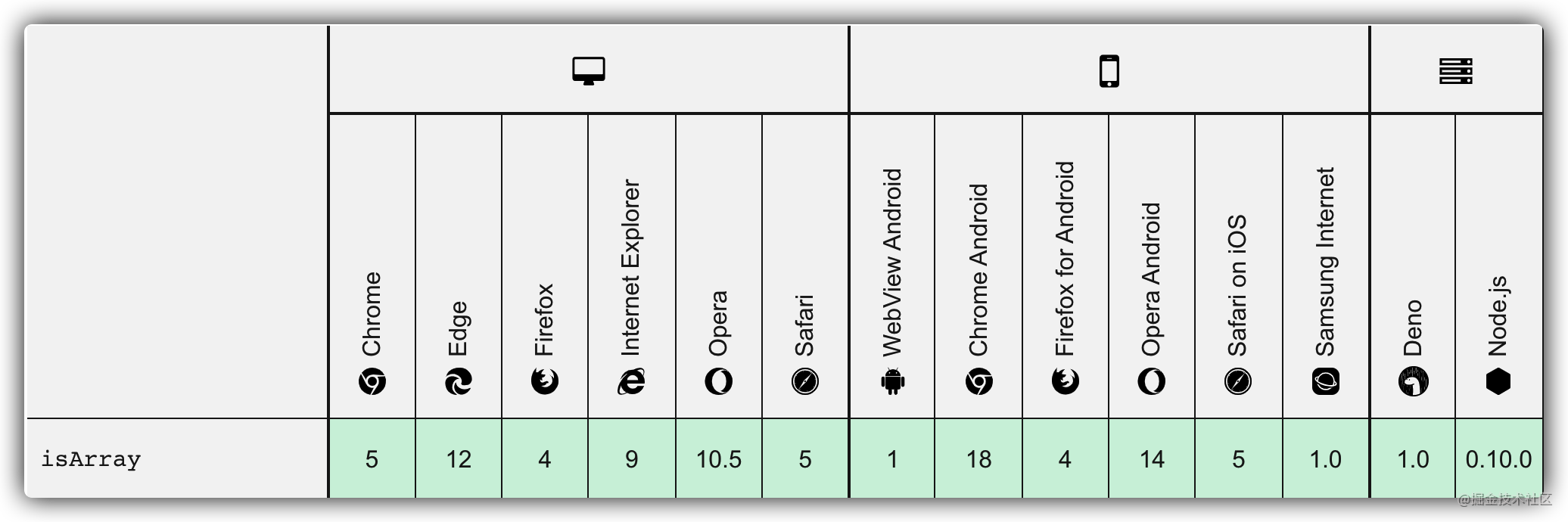
从兼容性图表可以看出,现代主流浏览器均已支持该方法,开发者可以放心在项目中应用。
constructor
Object 的每个实例都包含一个 constructor 属性,该属性指向创建当前对象的构造函数。
let arr = [];
console.log(arr.constructor === Array); // true
然而,constructor 属性存在被意外修改的风险,这会导致判断结果不准确。例如:
let arr = [1, 2, 3];
arr.constructor = function () { }
console.log(arr.constructor === Array); // false
因此,一般不推荐使用 constructor 来判断数组类型,了解其存在即可。
instanceof
instanceof 运算符用于检测构造函数的 prototype 属性是否存在于某个实例对象的原型链中。具体示例如下:
// 定义构造函数
function C() {}
function D() {}

var o = new C();

o instanceof C; // true,因为 Object.getPrototypeOf(o) === C.prototype

o instanceof D; // false,因为 D.prototype 不在 o 的原型链上

o instanceof Object; // true,因为 Object.prototype.isPrototypeOf(o) 返回 true
C.prototype instanceof Object; // true,同上
使用 instanceof 判断数组的用法如下:
let arr = [];
console.log(arr instanceof Array); // true
使用 instanceof 时需注意以下两点限制:
- 构造函数的 prototype 属性以及实例的原型链均可能被修改,因此判断结果并非绝对稳定。
- 在包含 iframe 的页面脚本中使用 instanceof 可能产生错误结果。这是因为 iframe 拥有独立的全局执行环境,不同全局环境下的全局对象及内置类型构造函数相互隔离。
isPrototypeOf
isPrototypeOf() 方法用于测试一个对象是否存在于另一个对象的原型链上。具体用法如下:
function Foo() {}
function Bar() {}
function Baz() {}

Bar.prototype = Object.create(Foo.prototype);
Baz.prototype = Object.create(Bar.prototype);

var baz = new Baz();

console.log(Baz.prototype.isPrototypeOf(baz)); // true
console.log(Bar.prototype.isPrototypeOf(baz)); // true
console.log(Foo.prototype.isPrototypeOf(baz)); // true
console.log(Object.prototype.isPrototypeOf(baz)); // true
若利用 isPrototypeOf 判断传入参数是否为数组,可采取以下方式:
let arr = [];
console.log(Array.prototype.isPrototypeOf(arr)); // true
Object.prototype.toString
每个对象都内置了 toString() 方法,当对象被转换为文本值或以字符串方式引用时,该方法会被自动调用。
默认情况下,toString() 方法被所有 Object 对象继承。若自定义对象未覆盖此方法,toString() 将返回 "[object type]" 字符串,其中 type 代表对象的类型。
我们可以利用 toString() 获取每个对象的具体类型。为了确保所有对象都能通过 Object.prototype.toString() 进行检测,需要以 Function.prototype.call() 或 Function.prototype.apply() 的形式调用该方法,并将待检查的对象作为第一个参数(即 thisArg)传入。具体用法如下:
var toString = Object.prototype.toString;

toString.call(new Date); // [object Date]
toString.call(new String); // [object String]
toString.call(Math); // [object Math]

//Since JavaScript 1.8.5
toString.call(undefined); // [object Undefined]
toString.call(null); // [object Null]
若用于判断对象是否为数组,可这样使用:
let arr = [];
console.log(Object.prototype.toString.call(arr) === "[object Array]"); // true
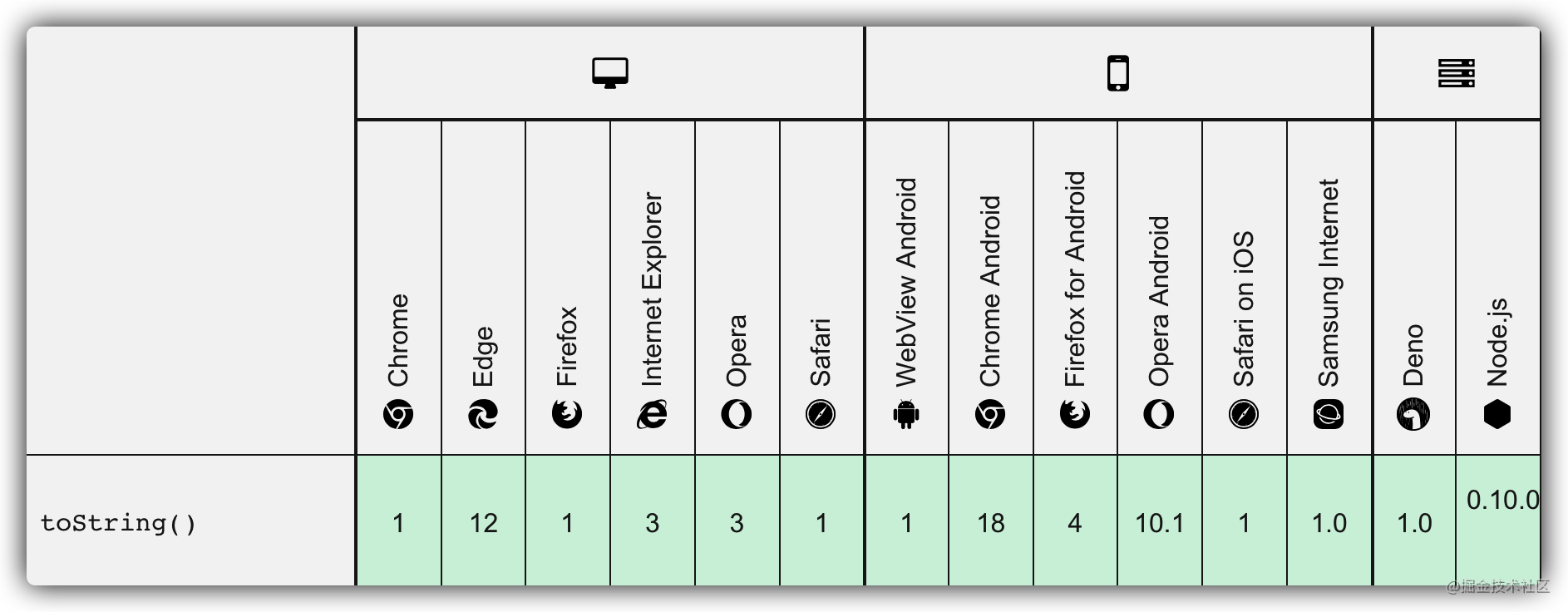
其兼容性情况如下:
typeof
谈及类型判断,许多人首先会想到 typeof 运算符,此处我们回顾一下 typeof 的相关知识。
typeof 操作符返回一个字符串,表示未经计算的操作数的类型。
console.log(typeof 42); // "number"
console.log(typeof 'blubber'); // "string"
console.log(typeof true); // "boolean"
console.log(typeof undeclaredVariable); // "undefined"
typeof 可能的返回值如下:
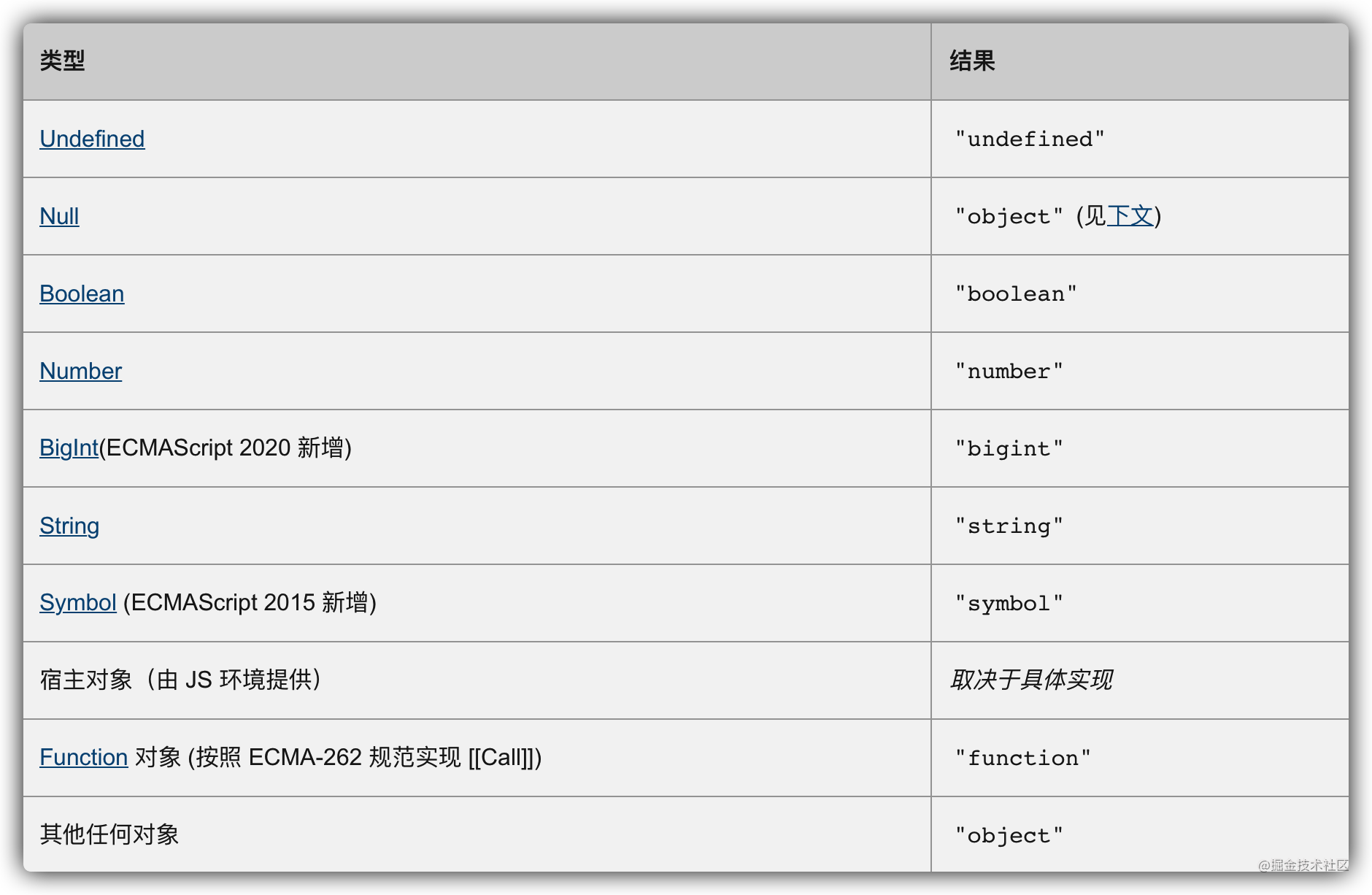
通过上图可见,数组对象属于“其他任何对象”,因此数组对象的 typeof 返回值是 “object”:
let arr = [];
console.log(typeof arr); // "object"
鉴于此,我们应尽量避免使用 typeof 来判断数组。
总结
以上介绍了判断值是否为数组的几种方法,其中既有推荐方案也有不推荐方案,但了解这些知识总有益处。总结如下:
- 最佳方案是 Array.isArray,但其不支持 IE8 及以下版本浏览器。
- 若需兼顾旧版浏览器兼容性,建议使用 Object.prototype.toString。
到此这篇关于JavaScript判断是否为数组的文章就介绍到这了,更多相关JavaScript判断是否为数组内容请搜索本站以前的文章或继续浏览下面的相关文章希望大家以后多多支持本站!
D3.js 比例尺与坐标轴的配置详解
2026-11-05 16:54:46
JavaScript怎么遍历对象的Symbol键和不可枚举属性
2026-11-05 13:13:39
封装一个健壮的JS字符串判空工具函数
2026-11-05 12:16:14
JavaScript合并数组的三种常用方法:concat、扩展运算符与push
2026-11-05 11:22:29
JavaScript立即执行函数(IIFE)是什么及基本语法
2026-11-05 10:51:19