

原生JavaScript实现打砖块小游戏完整代码
本文提供了一款使用原生JavaScript编写的打砖块小游戏完整代码。无需任何插件,直接复制到HTML即可运行。文章详细解析了小球速度计算、滑块控制逻辑及碰撞检测机制,并指出了当前版本存在的按键边界与精度问题,适合用于锻炼前端逻辑思维能力。
原生JavaScript打砖块游戏实现
本文分享了一个使用JavaScript实现的打砖块弹球小游戏的完整代码示例,供读者参考学习。
该游戏完全基于原生JavaScript开发,未依赖任何第三方库。虽然代码尚存细微瑕疵,但用户只需将其直接复制到HTML文件中即可直接运行使用。
小球的速度是随机生成的,涉及横向与纵向两个方向的分量,因此界面上显示的速度值为这两个分量的合成速度(即立方和开根号)。游戏启动方式包括按下回车键或在滑块区域单击鼠标左键。控制滑块移动可通过鼠标滑动,或使用键盘的A键(向左)和D键(向右)来调整位置以接住小球。此Demo的主要目的在于锻炼开发者的编程逻辑能力。
<!DOCTYPE html>
<html>
<head>
<meta charset="UTF-8">
<title>document</title>
<style>
.container{
    width: 500px;
    height: 500px;
    border:1px solid #000;
    margin:auto;
    position:relative;
}
.brickBox{
    width: 500px;
    height: 300px;
    /* background-color: yellowgreen; */
    position:absolute;
    left: 0;
    top: 0;
}
.ball{
    width: 15px;
    height: 15px;
    background-color:purple;
    border-radius:50%;
    position:absolute;
    bottom:30px;
    left:235px;
    /* margin-left:-15px; */
}
.slider{
    width: 150px;
    height: 30px;
    background-color: #00f;
    position:absolute;
    /* left:50%; */
    left:175px;
    /* margin-left:-75px; */
    bottom:0;
}
</style>
</head>
<body>
<div class="container">
    <div class="brickBox"></div>
    <div class="ball"></div>
    <div class="slider"></div>
</div>
<div style="margin-left: 40%;font-size: 25px;">当前速度: <span id="speed"></span> </div>
<div style="margin-left: 40% ;font-size: 25px;">当前打掉的方块数: <span id="count"></span> </div>

</body>
<script>
// 获取当前所有标签
var container = document.querySelector('.container')
var brickBox = container.querySelector('.brickBox')
var ball = container.querySelector('.ball')
var slider = container.querySelector('.slider')
// 动态创建砖块
// 定义砖块大小
var brickWidth = 50;
var brickHeight = 15;
// 计算砖块数量
var brickNum = brickBox.clientWidth * brickBox.clientHeight / (brickWidth * brickHeight)
// console.log(brickNum);
var brickColNum = brickBox.clientWidth / brickWidth
// 根据数量去创建
for(var i=0;i<brickNum;i++){
    var div = document.createElement('div')
    setStyle(div,{
        width:brickWidth + "px",
        height:brickHeight + "px",
        backgroundColor:getColor(true),
        position:'absolute',
        top:parseInt(i/brickColNum)*brickHeight + 'px',
        left:(i%brickColNum)*brickWidth + 'px'
    })
    brickBox.appendChild(div)
}


// 点击滑块让小球开始运动
// 定义横向移动的值和纵向移动的值
var speedX = getRandom(1,8);
var speedY = getRandom(1,8);
document.querySelector("#speed").innerHTML= Math.sqrt(Math.pow(speedX,2)+Math.pow(speedY,2))
var timer;
//点击移动
slider.onclick = move;
//回车键开始弹


function move(){
    var count=0;
    clearInterval(timer)
    timer = setInterval(function(){
        // 开始移动
        // 获取小球的left和top
        let left = ball.offsetLeft;
        let top = ball.offsetTop;

        // 让left和top增加速度
        // 小球和滑块相撞
        if(boom(slider,ball)){
            speedY = -speedY
        }
        // 小球和大盒子相撞
        if(left<=0 || left>=container.clientWidth - ball.offsetWidth){
            speedX = -speedX
        }
        if(top<=0){
            speedY = -speedY
        }
        // 检测所有砖块和小球是否相撞
        for(let i=0;i<brickBox.children.length;i++){
            if(boom(brickBox.children[i],ball)){

                speedY = -speedY
                brickBox.removeChild(brickBox.children[i]);
                count++;
            }


        }
        console.log(count)
        document.querySelector("#count").innerHTML=count
        // GAME OVER
        if(top>=container.clientHeight-ball.offsetHeight){
            clearInterval(timer)
            if(confirm("GAME OVER,是否重玩")){
   location.reload();
  }else{alert('您最终分数'+count)}
        }
        left += speedX
        top += speedY
        // 设置给小球的left和top
        ball.style.left = left + "px"
        ball.style.top = top + "px"
    },20)
}

// 让滑块跟着鼠标移动
slider.onmouseover = function(){
    document.onmousemove = function(e){
        var e = e || window.event;
        var x = e.pageX;
        var l = x - container.offsetLeft - 1 - slider.offsetWidth/2
        if(l<0){
            l = 0
        }
        if(l > container.clientWidth - slider.offsetWidth){
            l = container.clientWidth - slider.offsetWidth
        }
        slider.style.left = l + "px"
    }
}
//让滑块跟着左右键盘移动
window.onload= function(){
    document.onkeydown = e=>{
        var e = e || window.event;
        var keycode = e.keyCode || e.which;
        var keyword = String.fromCharCode(keycode).toLowerCase();
        if(keycode==13){
            move();
        }
       if(keyword=='a'){
           console.log("1111")
        slider.style.left= slider.offsetLeft-15+"px"
       }else if(keyword=='d'){
        console.log("222")
           slider.style.left=slider.offsetLeft+15+"px"
       }
       console.log(slider.offsetLeft)


    }

}
// 封装检测相撞的函数
function boom(node1,node2){
    // 不撞在一起的只有4中可能
    if(node1.offsetLeft+node1.offsetWidth<node2.offsetLeft || node1.offsetTop+node1.offsetHeight<node2.offsetTop || node2.offsetLeft+node2.offsetWidth<node1.offsetLeft || node2.offsetTop+node2.offsetHeight<node1.offsetTop){
        return false;
    }else{
        return true;
    }
}
// 封装获取随机颜色的函数
function getColor(hex=true){
    if(hex){
        var color = '#'
        for(var i=0;i<3;i++){
            var rgb = getRandom(256).toString(16);
            rgb = rgb.length===1?'0'+rgb:rgb;
            color += rgb
        }
        return color;
    }
    return `rgb(${getRandom(256)},${getRandom(256)},${getRandom(256)})`
}
// 封装设置样式的函数
function setStyle(ele,styleObj){
    for(var attr in styleObj){
            ele.style[attr] = styleObj[attr]
    }
}
// 封装获取随机数的函数
function getRandom(a,b=0){
    var max = Math.max(a,b);
    var min = Math.min(a,b)
    return Math.floor(Math.random() * (max-min)) + min
}
</script>
</html>
游戏运行效果如图所示。
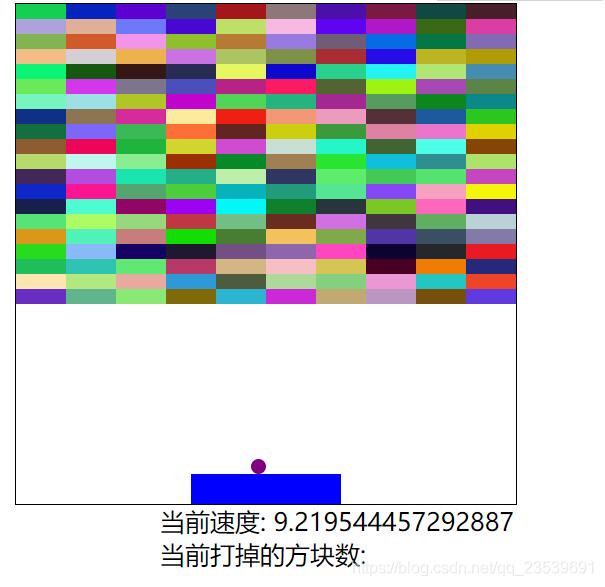
由于未使用任何UI插件,界面样式较为简陋。此外,代码中仍存在一个已知BUG:左右方向键未设置明确的终止边界值,偶尔会因位置精度丢失导致小球在滑块上出现视觉上的抽搐现象。
以上就是本文的全部内容,希望能为读者的学习提供一定帮助,同时也欢迎大家对本站给予支持。
JavaScript怎么准确判断数据类型:typeof、instanceof与Object.prototype.toString
2026-11-05 17:09:21
JS中将数组和对象混合组装为JSON字符串
2026-11-05 16:41:42
JS运算符优先级与结合性的区别是什么?
2026-11-05 13:22:02
JS Map怎么只遍历Key或Value
2026-11-05 13:00:36
D3.js 与 ECharts 选型对比:灵活性 vs 开发效率
2026-11-05 09:45:01