

JavaScript 实现可拖拽进度条
作者:纸飞机时间:2026-10-24 11:14:49浏览:593
本文提供了一段 JavaScript 实现可拖拽进度条的具体代码。通过定义 scale 对象处理鼠标事件,动态调整进度条宽度和显示百分比数值,实现用户交互功能。
本文分享了一段使用 JavaScript 编写的可拖拽进度条的具体代码,供读者参考。
进度条的实现逻辑
<html>
<head>
  <meta http-equiv="X-UA-Compatible" content="IE=edge">
  <meta name="viewport" content="width=device-width, initial-scale=1">
  <meta charset="UTF-8">
<title>可拖拽进度条</title>
<style>
body{
 margin:50px; ;
}

.box {
  width:49%;
  hegiht:3rem;
  line-height:3rem;
  float:left;
}
.boxDesc {
  width:50%;
  hegiht:3rem;
  line-height:0.3rem;
  float:left;
}

.scale span{
 background:url(scroll.gif) no-repeat;
 width:8px;
 height:16px;
 position:absolute;
 left:-2px;
 top:-5px;
 cursor:pointer;
}
.scale{ background-repeat: repeat-x; background-position: 0 100%; background-color: #E4E4E4; border-left: 1px #83BBD9 solid;  width: 100%; height: 10px; position: relative; font-size: 0px; border-radius: 3px; }
.scale div{ background-repeat: repeat-x; background-color: green;  position: absolute; height: 10px; left: 0; bottom: 0; }
li{
 font-size:12px;
 line-height:50px;
 position:relative;
 height:50px;
 list-style:none;
}
</style>
</head>
<body>
<ul style='width:100%;margin-top:15rem;'>
 <li>
    <div class = 'box'>
  <div class="scale" id="bar">
   <div></div>
   <span id="btn"></span>
  </div>
    </div>
  <div class='boxDesc'>
  <span id="title">0</span>
  </div>
 </li>

</ul>
</body>
<script>
scale=function (btn,bar,title){
 this.btn=document.getElementById(btn);
 this.bar=document.getElementById(bar);
 this.title=document.getElementById(title);
 this.step=this.bar.getElementsByTagName("DIV")[0];
 this.init();
};
scale.prototype={
 init:function (){
  var f=this,g=document,b=window,m=Math;
  f.btn.onmousedown=function (e){
   var x=(e||b.event).clientX;
   var l=this.offsetLeft;
   var max=f.bar.offsetWidth-this.offsetWidth;
   g.onmousemove=function (e){
    var thisX=(e||b.event).clientX;
    var to=m.min(max,m.max(-2,l+(thisX-x)));
    f.btn.style.left=to+'px';
    f.ondrag(m.round(m.max(0,to/max)*100),to);
    b.getSelection ? b.getSelection().removeAllRanges() : g.selection.empty();
   };
   g.onmouseup=new Function('this.οnmοusemοve=null');
  };
 },
 ondrag:function (pos,x){
  this.step.style.width=Math.max(0,x)+'px';
  this.title.innerHTML=pos+'%';
 }
}
new scale('btn','bar','title');
</script>
</html>
最终呈现的视觉效果
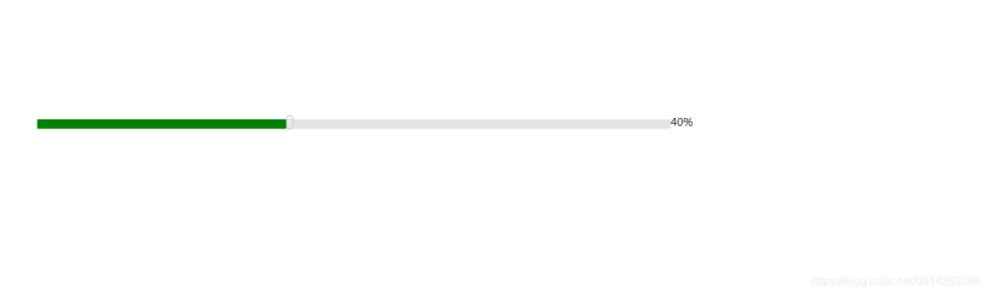
以上就是本文的全部内容,希望对大家的学习有所帮助,也希望大家多多支持本站。
作者最新文章
JS动态构建复杂嵌套JSON对象的方法
2026-11-05 15:41:52
JS负数取余为什么是负数?详解余数与模运算区别
2026-11-05 13:34:41
JS 解压出现乱码或报错怎么解决?
2026-11-05 12:32:38
JS 中 startsWith、indexOf 与正则判断字符串前缀的对比
2026-11-04 22:19:43
JS解析Excel后怎么将数据转换为JSON格式
2026-11-04 20:58:28