

Broadcast Channel API 实现同源页面间通信详解
本文详细介绍 Broadcast Channel API 的实现原理与应用。该 API 支持同源下不同窗口、Tab 页及 iframe 间的简单通信,可发送字符串及多种对象类型。文章通过数据同步与多 Tab 退出监测两个实例演示具体用法,并对比 postMessage API,指出 Broadcast Channel 无需维护引用且仅限同源,最后提供兼容性处理建议。
一、Broadcast Channel API 简介
Broadcast Channel API 能够实现同源环境下,浏览器内不同窗口、Tab 标签页或 iframe 嵌入页面之间的轻量级通信。通过实例化一个监听特定频道的 BroadcastChannel 对象,应用即可接收发往该频道的所有消息。
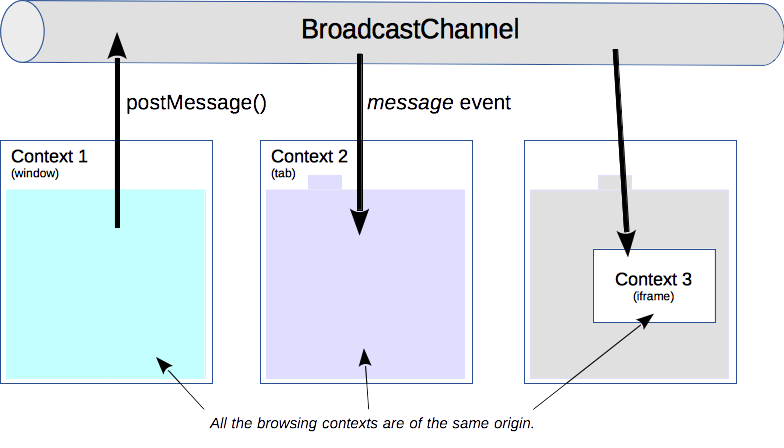
(图片来源 —— https://developer.mozilla.org/zh-CN/docs/Web/API/Broadcast_Channel_API)
明确 Broadcast Channel API 的功能后,接下来探讨其具体使用方法:
// 创建一个用于广播的通信通道
const channel = new BroadcastChannel('my_bus');

// 在my_bus上发送消息
channel.postMessage('大家好,我是阿宝哥');

// 监听my_bus通道上的消息
channel.onmessage = function(e) {
  console.log('已收到的消息:', e.data);
};

// 关闭通道
channel.close();
从上述示例可以看出,Broadcast Channel API 的使用门槛较低。除了传输字符串外,该 API 还支持发送其他类型的数据对象,例如 Blob、File、ArrayBuffer 以及 Array 等。此外,在实际项目部署中,必须关注浏览器的兼容性问题:

(图片来源 —— https://caniuse.com/?search=Broadcast%20Channel%20API)
根据上图显示,IE 11 及更低版本的浏览器不支持 Broadcast Channel API。针对此类情况,开发者可选用现成的 broadcast-channel-polyfill 库,或基于 localStorage 配合 storage 事件自行实现兼容方案。
二、Broadcast Channel API 应用场景
借助 Broadcast Channel API,可以轻松实现同源页面间的一对多通信模式。该 API 的典型应用场景包括:
- 实现同源页面间的数据同步;
- 在其他 Tab 页面中监测用户操作;
- 指导 worker 执行后台任务;
- 获知用户在另一个 window 或 tab 中登录账户的状态。
为了帮助读者深入掌握 Broadcast Channel API,以下将以前述两个场景为例,详细解析该 API 的具体应用方式。
2.1 实现同源页面间数据同步
html
<h3 id="title">你好,</h3>
<input id="userName" placeholder="请输入你的用户名" />
JS
const bc = new BroadcastChannel("abao_channel");

(() => {
  const title = document.querySelector("#title");
  const userName = document.querySelector("#userName");

  const setTitle = (userName) => {
    title.innerHTML = "你好," + userName;
  };

  bc.onmessage = (messageEvent) => {
    if (messageEvent.data === "update_title") {
      setTitle(localStorage.getItem("title"));
    }
  };

  if (localStorage.getItem("title")) {
    setTitle(localStorage.getItem("title"));
  } else {
    setTitle("请告诉我们你的用户名");
  }

  userName.onchange = (e) => {
    const inputValue = e.target.value;
    localStorage.setItem("title", inputValue);
    setTitle(inputValue);
    bc.postMessage("update_title");
  };
})();
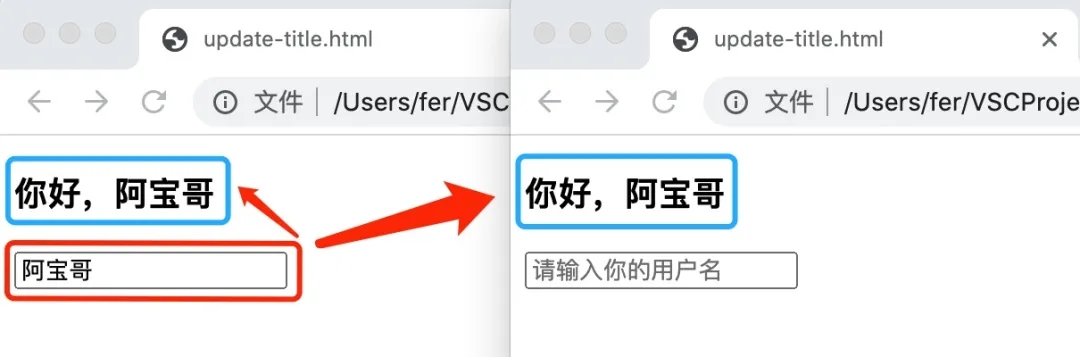
在上述示例中,完成了同源页面间的数据同步功能。当任意已打开页面的输入框内容发生变化时,页面中 h3#title 元素的内容将自动同步更新。
2.2 在其它 Tab 页面中监测用户操作
利用 Broadcast Channel API,除了实现同源页面间的数据同步外,还可用于监测其他 Tab 页面中的用户操作。例如,当用户在任一 Tab 中执行退出操作后,其他已打开的 Tab 页面也能自动执行退出逻辑,从而保障系统安全性。
html
<h3 id="status">当前状态:已登录</h3>
<button onclick="logout()">退出</button>
JS
const status = document.querySelector("#status");
const logoutChannel = new BroadcastChannel("logout_channel");

logoutChannel.onmessage = function (e) {
  if (e.data.cmd === "logout") {
    doLogout();
  }
};

function logout() {
  doLogout();
  logoutChannel.postMessage({ cmd: "logout", user: "阿宝哥" });
}

function doLogout() {
  status.innerText = "当前状态:已退出";
}
在上述示例中,当用户点击退出按钮时,当前页面执行退出逻辑,同时通过 logoutChannel 通知其他已打开的页面执行相应的退出操作。
三、Broadcast Channel API vs postMessage API
与 postMessage() 不同,使用 Broadcast Channel API 时,无需维护对 iframe 或 worker 的引用即可进行通信:
const popup = window.open('https://another-origin.com', ...);
popup.postMessage('Sup popup!', 'https://another-origin.com');
Broadcast Channel API 仅适用于实现同源下浏览器不同窗口、Tab 页或 iframe 下的浏览器上下文之间的简单通信。而 postMessage API 则可用于实现不同源之间的消息通信。由于 Broadcast Channel 保证了消息来自同一来源,因此无需像以往那样使用特定方法来验证消息来源:
const iframe = document.querySelector('iframe');
iframe.contentWindow.onmessage = function(e) {
  if (e.origin !== 'https://expected-origin.com') {
    return;
  }
  e.source.postMessage('Ack!', e.origin);
};
四、总结
Broadcast Channel API 是一个接口简洁的 API,内部封装了跨上下文通信的功能。在支持该 API 的浏览器环境中,开发者可以利用它轻松实现同源页面间的通信。对于不支持该 API 的旧版浏览器,可考虑使用 localStorage 结合 storage 事件来解决同源页面间的通信需求。
五、参考资源
MDN - Broadcast Channel API BroadcastChannel API: A Message Bus for the Web
以上就是JavaScript 如何实现同源通信的详细内容,更多关于JavaScript 同源通信的资料请关注本站其它相关文章!
Mock.js 拦截失效或数据格式错误的常见原因及排查
2026-11-05 10:11:59
Java和JavaScript名字像但没关系:辨析Java、JavaWeb与JS
2026-11-04 09:30:54
CodePen、JSFiddle与RunJS对比:哪款JS在线运行工具更适合你?
2026-11-03 16:46:57
JS 统计图渲染空白或报错怎么排查?常见问题解决指南
2026-11-03 09:49:40
flv.js 常见报错 MediaError 与解码失败排查指南
2026-11-02 10:29:29