

Openclaw安装指南:终于成功部署的详细步骤
人只要活得足够久,就能见到各种神奇的事! 这世界总会不断冒出些新奇玩意儿。比如最近有这么一款软件,短短三天之内,它的名字就从Clawdbot变成了Moltbot,最后又定格为OpenClaw,颇有点“一天一个样”的戏剧感。 其官网目前显示为“Reported Unsafe Site: Navigat
人只要活得足够久,就能见到各种神奇的事!
这世界总会不断冒出些新奇玩意儿。比如最近有这么一款软件,短短三天之内,它的名字就从Clawdbot变成了Moltbot,最后又定格为OpenClaw,颇有点“一天一个样”的戏剧感。
其官网目前显示为“Reported Unsafe Site: Navigation Blocked”,而代码仓库则位于:openclaw/openclaw: Your own personal AI assistant. Any OS. Any Platform. The lobster way.
安装
安装过程倒不复杂。直接执行命令:
npm install -g openclaw@latest
当然,你也可以选择使用官网提供的一站式安装命令:
curl -fsSL https://openclaw.ai/install.sh | bash
安装完成后,通常会遇到一个环境变量提示。具体来说,就是把下面这句添加到你的 shell 配置文件中(比如 ~/.zshrc 或 ~/.bashrc):
export PATH="/home/skywalk/.npm-global/bin:\/home/skywalk/.npm-global/bin:/usr/local/sbin:/usr/local/bin:/usr/sbin:/usr/bin:/sbin:/bin:/usr/games:/usr/local/games:/snap/bin"
简单来说,加上这行配置,OpenClaw 就能在终端里被正常唤醒了。
启动
接下来,激动人心的一步,直接输入:
openclaw
这回终于启动成功了!屏幕上立刻呈现出详细的安装与启动过程:
curl -fsSL https://openclaw.ai/install.sh | bashsh
Learn more →
OpenClaw Installer
Your task has been queued; your dignity has been deprecated.
Detected: linux
Node.js v24.12.0 found
Git already installed
→ Installing OpenClaw 2026.1.29...
OpenClaw installed
→ PATH warning: missing npm global bin dir: /home/skywalk/.npm-global/bin
This can make openclaw show as "command not found" in new terminals.
Fix (zsh: ~/.zshrc, bash: ~/.bashrc):
export PATH="/home/skywalk/.npm-global/bin:\/home/skywalk/.npm-global/bin:/usr/local/sbin:/usr/local/bin:/usr/sbin:/usr/bin:/sbin:/bin:/usr/games:/usr/local/games:/snap/bin"
Docs: https://docs.openclaw.ai/install#nodejs--npm-path-sanity
OpenClaw installed successfully (2026.1.29)!
cracks claws Alright, what are we building
Starting setup...
OpenClaw 2026.1.29 (a5b4d22)
I'm the reason your shell history looks like a hacker-movie montage.
▄▄▄▄▄▄▄▄▄▄▄▄▄▄▄▄▄▄▄▄▄▄▄▄▄▄▄▄▄▄▄▄▄▄▄▄▄▄▄▄▄▄▄▄▄▄▄▄▄▄▄▄
██▄▄▄██▄▄██▄▄▄██████▄▄██████▄▄███████
█████████▄▄▄█████████████████████
█████████████▄██▄███████▄▄▄██
OPENCLAW
┌ OpenClaw onboarding
│
◇ Security ────────────────────────────────────────────────────────────────────╮
│ │
│ Security warning — please read. │
│ │
│ OpenClaw is a hobby project and still in beta. Expect sharp edges. │
│ This bot can read files and run actions if tools are enabled. │
│ A bad prompt can trick it into doing unsafe things. │
│ │
│ If you’re not comfortable with basic security and access control, don’t run │
│ OpenClaw. │
│ Ask someone experienced to help before enabling tools or exposing it to the │
│ internet. │
│ │
│ Recommended baseline: │
│ - Pairing/allowlists + mention gating. │
│ - Sandbox + least-privilege tools. │
│ - Keep secrets out of the agent’s reachable filesystem. │
│ - Use the strongest available model for any bot with tools or untrusted │
│ inboxes. │
│ │
│ Run regularly: │
│ openclaw security audit --deep │
│ openclaw security audit --fix │
│ │
│ Must read: https://docs.openclaw.ai/gateway/security │
│ │
├───────────────────────────────────────────────────────────────────────────────╯
│
◇ I understand this is powerful and inherently risky. Continue
│ Yes
│
◇ Onboarding mode
│ QuickStart
│
◇ QuickStart ─────────────────────────╮
│ │
│ Gateway port: 18789 │
│ Gateway bind: Loopback (127.0.0.1) │
│ Gateway auth: Token (default) │
│ Tailscale exposure: Off │
│ Direct to chat channels. │
│ │
├──────────────────────────────────────╯
│
◇ Model/auth provider
│ Xiaomi
│
◆ Xiaomi auth method
│ ● Xiaomi API key
│ ○ Back
└
启动面板
界面初始化后,接下来需要进行一些基础配置。
openclaw onboard --install-daemon
配置项看起来不少,不过实际操作中,除了填入一个大模型的API key是必须的,其余选项暂且可以保持默认。
启动服务
之后,启动网关服务:
openclaw gateway --port 18789 --verbose
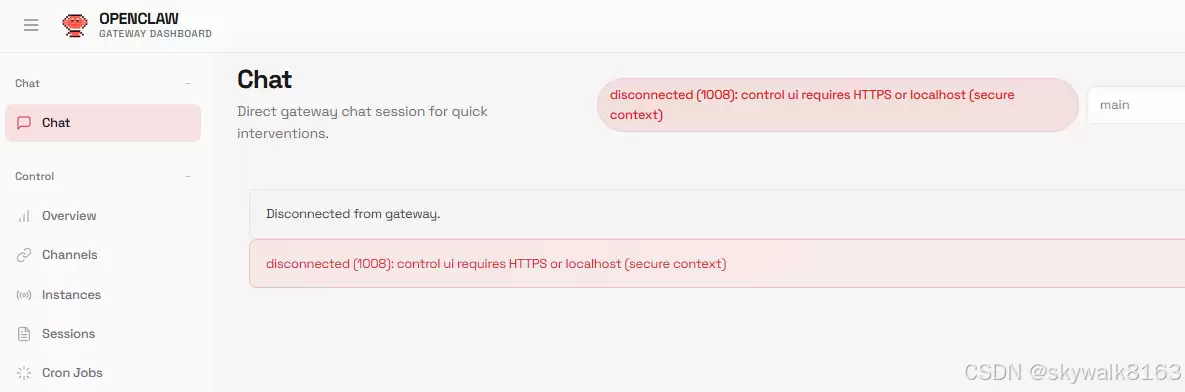
很快,提示服务已成功侦听在18789端口。用浏览器访问对应的地址:
http://192.168.1.12:18789/
就能看到以下的管理界面:
为了测试其消息发送功能,尝试执行命令:
openclaw message send --to +xxxx --message "Hello from OpenClaw"
结果遇到了报错:
error: required option '-t, --target
看来事情没这么简单。初步判断,如果不集成或连接其他外部通讯软件(如 Slack、Discord 等),仅仅依靠 OpenClaw 自身,可能无法直接发送外部消息。这成了一个关键的限制。
于是,实践探索暂时就到这里。对于一个处于快速变化中的新项目来说,理清核心功能与外接依赖的关系,永远是第一步。