

基于jQuery与HTML5的学生信息管理系统实现详解
本文介绍使用JavaScript、HTML5及jQuery构建的学生信息管理系统。系统采用数组存储学生对象,实现数据与界面的双向绑定。功能涵盖新增、修改、查看及删除(含逻辑删除),利用HTML5 pattern进行表单验证,并实现了分页、隔行换色及交互效果。
一、前言
系统采用数组结构存储所有学生对象的数据,实现了数据与界面的双向更新机制。在初始化阶段,数组内的对象信息会被填充至界面;后续在界面上进行的任何操作,均能同步更新数组中对象的数据量及其具体数据域信息。
该方案的优点在于利用jQuery处理了许多前端交互细节,代码逻辑较为完善。
在表单验证方面,系统结合HTML5的pattern属性与正则表达式,实现了严格的数据合法性校验及相应的用户提示信息。
主要缺点在于后台删除学生对象信息的代码处理效率较低。此处采用了一种“假”删除机制,即通过移动学生对象在数组中的索引位置并调整数组长度来实现,而非直接移除元素。
CSS样式部分存在界面缩放适配问题。由于开发重心未完全偏向前端展示,该部分暂未进行深度优化。
部分代码逻辑具备进一步优化的空间,以实现更好的代码复用,但当前版本尚未对此进行处理。
二、效果图
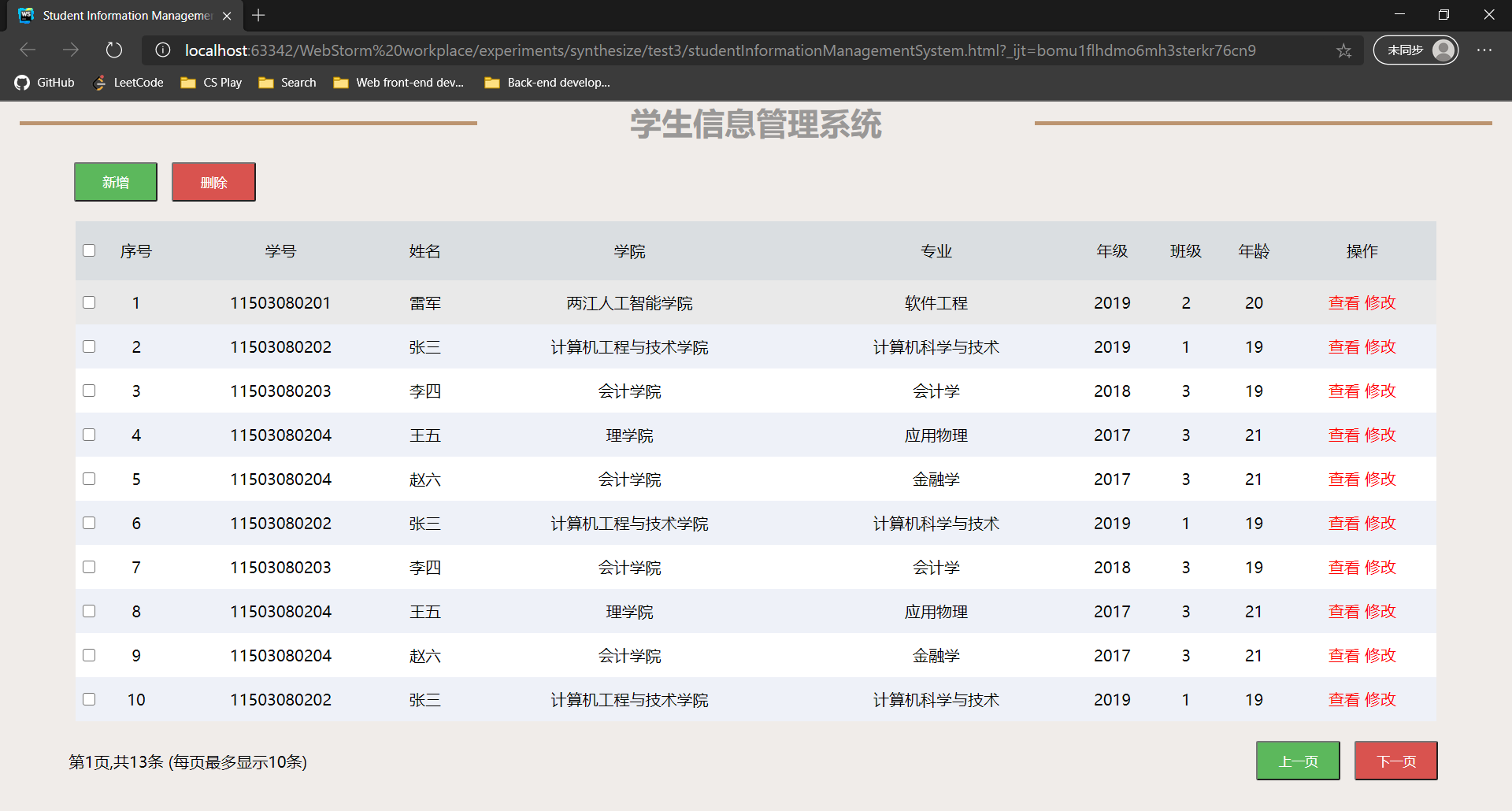
三、代码
为保留开发过程中的思考与改进轨迹,代码中未删除早期版本的实现,因此整体代码量较长。
若移除注释代码及冗余部分,代码结构将更为精简。
HTML:
<!DOCTYPE html>
<html lang="en">
<head>
    <meta charset="UTF-8">
    <title>Student Information Management System</title>
    <script src="../../../JQuery/JQuery.js"></script>
    <link rel="stylesheet" href="../studentInformationManagementSystemCss/studentInformationManagementSystem.css" rel="external nofollow" >
    <script src="../studentInformationManagementSystemJs/studentInformationManagementSystem.js"></script>
</head>
<body>
<div>
    <header>
        <hr/>
        <h1>学生信息管理系统</h1>
        <hr/>
    </header>
    <main>
        <div>
            <div id="adbt">
                <button class="gre" id="add">新增</button>
                <button class="red" id="delete">删除</button>
            </div>
            <table>
                <tbody>
                <tr id="thead">
                    <td><input type="checkbox"></td>
                    <td>序号</td>
                    <td>学号</td>
                    <td>姓名</td>
                    <td>学院</td>
                    <td>专业</td>
                    <td>年级</td>
                    <td>班级</td>
                    <td>年龄</td>
                    <td>操作</td>
                </tr>
                <!--<tr>
                    <td name="abc"><input type="checkbox"></td>
                    <td>1</td>
                    <td>11503080201</td>
                    <td>张三</td>
                    <td>计算机科学与工程学院</td>
                    <td>软件工程</td>
                    <td>2015</td>
                    <td>2</td>
                    <td>21</td>
                    <td><a href="#" rel="external nofollow"  rel="external nofollow"  rel="external nofollow"  rel="external nofollow"  rel="external nofollow"  rel="external nofollow"  rel="external nofollow"  rel="external nofollow"  rel="external nofollow"  rel="external nofollow"  rel="external nofollow"  rel="external nofollow"  rel="external nofollow"  rel="external nofollow"  rel="external nofollow"  rel="external nofollow"  rel="external nofollow"  rel="external nofollow"  rel="external nofollow"  rel="external nofollow"  class="check">查看</a> <a href="#" rel="external nofollow"  rel="external nofollow"  rel="external nofollow"  rel="external nofollow"  rel="external nofollow"  rel="external nofollow"  rel="external nofollow"  rel="external nofollow"  rel="external nofollow"  rel="external nofollow"  rel="external nofollow"  rel="external nofollow"  rel="external nofollow"  rel="external nofollow"  rel="external nofollow"  rel="external nofollow"  rel="external nofollow"  rel="external nofollow"  rel="external nofollow"  rel="external nofollow"  class="modify">修改</a></td>
                </tr>
                <tr>
                    <td><input type="checkbox"></td>
                    <td>2</td>
                    <td>11503080202</td>
                    <td>李四</td>
                    <td>会计学院</td>
                    <td>会计学</td>
                    <td>2015</td>
                    <td>1</td>
                    <td>19</td>
                    <td><a href="#" rel="external nofollow"  rel="external nofollow"  rel="external nofollow"  rel="external nofollow"  rel="external nofollow"  rel="external nofollow"  rel="external nofollow"  rel="external nofollow"  rel="external nofollow"  rel="external nofollow"  rel="external nofollow"  rel="external nofollow"  rel="external nofollow"  rel="external nofollow"  rel="external nofollow"  rel="external nofollow"  rel="external nofollow"  rel="external nofollow"  rel="external nofollow"  rel="external nofollow"  class="check">查看</a> <a href="#" rel="external nofollow"  rel="external nofollow"  rel="external nofollow"  rel="external nofollow"  rel="external nofollow"  rel="external nofollow"  rel="external nofollow"  rel="external nofollow"  rel="external nofollow"  rel="external nofollow"  rel="external nofollow"  rel="external nofollow"  rel="external nofollow"  rel="external nofollow"  rel="external nofollow"  rel="external nofollow"  rel="external nofollow"  rel="external nofollow"  rel="external nofollow"  rel="external nofollow"  class="modify">修改</a></td>
                </tr>
                <tr>
                    <td><input type="checkbox"></td>
                    <td>3</td>
                    <td>11503080203</td>
                    <td>王二</td>
                    <td>理学院</td>
                    <td>数学</td>
                    <td>2015</td>
                    <td>1</td>
                    <td>19</td>
                    <td><a href="#" rel="external nofollow"  rel="external nofollow"  rel="external nofollow"  rel="external nofollow"  rel="external nofollow"  rel="external nofollow"  rel="external nofollow"  rel="external nofollow"  rel="external nofollow"  rel="external nofollow"  rel="external nofollow"  rel="external nofollow"  rel="external nofollow"  rel="external nofollow"  rel="external nofollow"  rel="external nofollow"  rel="external nofollow"  rel="external nofollow"  rel="external nofollow"  rel="external nofollow"  class="check">查看</a> <a href="#" rel="external nofollow"  rel="external nofollow"  rel="external nofollow"  rel="external nofollow"  rel="external nofollow"  rel="external nofollow"  rel="external nofollow"  rel="external nofollow"  rel="external nofollow"  rel="external nofollow"  rel="external nofollow"  rel="external nofollow"  rel="external nofollow"  rel="external nofollow"  rel="external nofollow"  rel="external nofollow"  rel="external nofollow"  rel="external nofollow"  rel="external nofollow"  rel="external nofollow"  class="modify">修改</a></td>
                </tr>
                <tr>
                    <td><input type="checkbox"></td>
                    <td>4</td>
                    <td>11503080204</td>
                    <td>张三</td>
                    <td>计算机科学与工程学院</td>
                    <td>软件工程</td>
                    <td>2015</td>
                    <td>2</td>
                    <td>21</td>
                    <td><a href="#" rel="external nofollow"  rel="external nofollow"  rel="external nofollow"  rel="external nofollow"  rel="external nofollow"  rel="external nofollow"  rel="external nofollow"  rel="external nofollow"  rel="external nofollow"  rel="external nofollow"  rel="external nofollow"  rel="external nofollow"  rel="external nofollow"  rel="external nofollow"  rel="external nofollow"  rel="external nofollow"  rel="external nofollow"  rel="external nofollow"  rel="external nofollow"  rel="external nofollow"  class="check">查看</a> <a href="#" rel="external nofollow"  rel="external nofollow"  rel="external nofollow"  rel="external nofollow"  rel="external nofollow"  rel="external nofollow"  rel="external nofollow"  rel="external nofollow"  rel="external nofollow"  rel="external nofollow"  rel="external nofollow"  rel="external nofollow"  rel="external nofollow"  rel="external nofollow"  rel="external nofollow"  rel="external nofollow"  rel="external nofollow"  rel="external nofollow"  rel="external nofollow"  rel="external nofollow"  class="modify">修改</a></td>
                </tr>
                <tr>
                    <td><input type="checkbox"></td>
                    <td>5</td>
                    <td>11503080205</td>
                    <td>李四</td>
                    <td>会计学院</td>
                    <td>会计学</td>
                    <td>2015</td>
                    <td>1</td>
                    <td>19</td>
                    <td><a href="#" rel="external nofollow"  rel="external nofollow"  rel="external nofollow"  rel="external nofollow"  rel="external nofollow"  rel="external nofollow"  rel="external nofollow"  rel="external nofollow"  rel="external nofollow"  rel="external nofollow"  rel="external nofollow"  rel="external nofollow"  rel="external nofollow"  rel="external nofollow"  rel="external nofollow"  rel="external nofollow"  rel="external nofollow"  rel="external nofollow"  rel="external nofollow"  rel="external nofollow"  class="check">查看</a> <a href="#" rel="external nofollow"  rel="external nofollow"  rel="external nofollow"  rel="external nofollow"  rel="external nofollow"  rel="external nofollow"  rel="external nofollow"  rel="external nofollow"  rel="external nofollow"  rel="external nofollow"  rel="external nofollow"  rel="external nofollow"  rel="external nofollow"  rel="external nofollow"  rel="external nofollow"  rel="external nofollow"  rel="external nofollow"  rel="external nofollow"  rel="external nofollow"  rel="external nofollow"  class="modify">修改</a></td>
                </tr>
                <tr>
                    <td><input type="checkbox"></td>
                    <td>6</td>
                    <td>11503080206</td>
                    <td>王二</td>
                    <td>理学院</td>
                    <td>数学</td>
                    <td>2015</td>
                    <td>1</td>
                    <td>19</td>
                    <td><a href="#" rel="external nofollow"  rel="external nofollow"  rel="external nofollow"  rel="external nofollow"  rel="external nofollow"  rel="external nofollow"  rel="external nofollow"  rel="external nofollow"  rel="external nofollow"  rel="external nofollow"  rel="external nofollow"  rel="external nofollow"  rel="external nofollow"  rel="external nofollow"  rel="external nofollow"  rel="external nofollow"  rel="external nofollow"  rel="external nofollow"  rel="external nofollow"  rel="external nofollow"  class="check">查看</a> <a href="#" rel="external nofollow"  rel="external nofollow"  rel="external nofollow"  rel="external nofollow"  rel="external nofollow"  rel="external nofollow"  rel="external nofollow"  rel="external nofollow"  rel="external nofollow"  rel="external nofollow"  rel="external nofollow"  rel="external nofollow"  rel="external nofollow"  rel="external nofollow"  rel="external nofollow"  rel="external nofollow"  rel="external nofollow"  rel="external nofollow"  rel="external nofollow"  rel="external nofollow"  class="modify">修改</a></td>
                </tr>
                <tr>
                    <td><input type="checkbox"></td>
                    <td>7</td>
                    <td>11503080207</td>
                    <td>张三</td>
                    <td>计算机科学与工程学院</td>
                    <td>软件工程</td>
                    <td>2015</td>
                    <td>2</td>
                    <td>21</td>
                    <td><a href="#" rel="external nofollow"  rel="external nofollow"  rel="external nofollow"  rel="external nofollow"  rel="external nofollow"  rel="external nofollow"  rel="external nofollow"  rel="external nofollow"  rel="external nofollow"  rel="external nofollow"  rel="external nofollow"  rel="external nofollow"  rel="external nofollow"  rel="external nofollow"  rel="external nofollow"  rel="external nofollow"  rel="external nofollow"  rel="external nofollow"  rel="external nofollow"  rel="external nofollow"  class="check">查看</a> <a href="#" rel="external nofollow"  rel="external nofollow"  rel="external nofollow"  rel="external nofollow"  rel="external nofollow"  rel="external nofollow"  rel="external nofollow"  rel="external nofollow"  rel="external nofollow"  rel="external nofollow"  rel="external nofollow"  rel="external nofollow"  rel="external nofollow"  rel="external nofollow"  rel="external nofollow"  rel="external nofollow"  rel="external nofollow"  rel="external nofollow"  rel="external nofollow"  rel="external nofollow"  class="modify">修改</a></td>
                </tr>
                <tr>
                    <td><input type="checkbox"></td>
                    <td>8</td>
                    <td>11503080208</td>
                    <td>李四</td>
                    <td>会计学院</td>
                    <td>会计学</td>
                    <td>2015</td>
                    <td>1</td>
                    <td>19</td>
                    <td><a href="#" rel="external nofollow"  rel="external nofollow"  rel="external nofollow"  rel="external nofollow"  rel="external nofollow"  rel="external nofollow"  rel="external nofollow"  rel="external nofollow"  rel="external nofollow"  rel="external nofollow"  rel="external nofollow"  rel="external nofollow"  rel="external nofollow"  rel="external nofollow"  rel="external nofollow"  rel="external nofollow"  rel="external nofollow"  rel="external nofollow"  rel="external nofollow"  rel="external nofollow"  class="check">查看</a> <a href="#" rel="external nofollow"  rel="external nofollow"  rel="external nofollow"  rel="external nofollow"  rel="external nofollow"  rel="external nofollow"  rel="external nofollow"  rel="external nofollow"  rel="external nofollow"  rel="external nofollow"  rel="external nofollow"  rel="external nofollow"  rel="external nofollow"  rel="external nofollow"  rel="external nofollow"  rel="external nofollow"  rel="external nofollow"  rel="external nofollow"  rel="external nofollow"  rel="external nofollow"  class="modify">修改</a></td>
                </tr>
                <tr>
                    <td><input type="checkbox"></td>
                    <td>9</td>
                    <td>11503080209</td>
                    <td>王二</td>
                    <td>理学院</td>
                    <td>数学</td>
                    <td>2015</td>
                    <td>1</td>
                    <td>19</td>
                    <td><a href="#" rel="external nofollow"  rel="external nofollow"  rel="external nofollow"  rel="external nofollow"  rel="external nofollow"  rel="external nofollow"  rel="external nofollow"  rel="external nofollow"  rel="external nofollow"  rel="external nofollow"  rel="external nofollow"  rel="external nofollow"  rel="external nofollow"  rel="external nofollow"  rel="external nofollow"  rel="external nofollow"  rel="external nofollow"  rel="external nofollow"  rel="external nofollow"  rel="external nofollow"  class="check">查看</a> <a href="#" rel="external nofollow"  rel="external nofollow"  rel="external nofollow"  rel="external nofollow"  rel="external nofollow"  rel="external nofollow"  rel="external nofollow"  rel="external nofollow"  rel="external nofollow"  rel="external nofollow"  rel="external nofollow"  rel="external nofollow"  rel="external nofollow"  rel="external nofollow"  rel="external nofollow"  rel="external nofollow"  rel="external nofollow"  rel="external nofollow"  rel="external nofollow"  rel="external nofollow"  class="modify">修改</a></td>
                </tr>
                <tr>
                    <td><input type="checkbox"></td>
                    <td>10</td>
                    <td>11503080210</td>
                    <td>张三</td>
                    <td>计算机科学与工程学院</td>
                    <td>软件工程</td>
                    <td>2015</td>
                    <td>2</td>
                    <td>21</td>
                    <td><a href="#" rel="external nofollow"  rel="external nofollow"  rel="external nofollow"  rel="external nofollow"  rel="external nofollow"  rel="external nofollow"  rel="external nofollow"  rel="external nofollow"  rel="external nofollow"  rel="external nofollow"  rel="external nofollow"  rel="external nofollow"  rel="external nofollow"  rel="external nofollow"  rel="external nofollow"  rel="external nofollow"  rel="external nofollow"  rel="external nofollow"  rel="external nofollow"  rel="external nofollow"  class="check">查看</a> <a href="#" rel="external nofollow"  rel="external nofollow"  rel="external nofollow"  rel="external nofollow"  rel="external nofollow"  rel="external nofollow"  rel="external nofollow"  rel="external nofollow"  rel="external nofollow"  rel="external nofollow"  rel="external nofollow"  rel="external nofollow"  rel="external nofollow"  rel="external nofollow"  rel="external nofollow"  rel="external nofollow"  rel="external nofollow"  rel="external nofollow"  rel="external nofollow"  rel="external nofollow"  class="modify">修改</a></td>
                </tr>-->
                </tbody>
            </table>
            <div id="navigate">
                <p>第<span id="pgn"></span>页,共<span id="en"></span>条 (每页最多显示10条)</p><!--Number of entries-->
                <div id="tpbt">
                    <button class="gre" id="lastpage">上一页</button>
                    <button class="red" id="nextpage">下一页</button>
                </div>
            </div>
        </div>
    </main>
</div>
<div id="sbg"></div><!--增删改查时的阴影背景-->
<div class="achaesi" id="asi">
<!--    <form action="" method="post">-->
    <h2>新增学生信息</h2>
    <div class="ifm">
        <div><label for="assn">学号</label> <input id="assn" type="text" placeholder="11503080201" required="required" maxlength="11" pattern="^[0-9]{11}$" oninvalid="setCustomValidity('请输入11位的数字组合')"></div>
        <div><label for="asn">姓名</label> <input id="asn" type="text" placeholder="雷军" required="required" minlength="2" maxlength="8" pattern="^[\u4e00-\u9fa5]+$" oninvalid="setCustomValidity('请输入正确的姓名')"></div>
        <div><label for="asac">学院</label> <input id="asac" type="text" placeholder="两江人工智能学院" required="required" minlength="3" maxlength="10" pattern="^[\u4e00-\u9fa5]+$" oninvalid="setCustomValidity('请输入正确的学院名')"></div>
        <div><label for="asm">专业</label> <input id="asm" type="text" placeholder="软件工程" required="required" minlength="3" maxlength="12" pattern="^[\u4e00-\u9fa5]+$" oninvalid="setCustomValidity('请输入正确的专业名')"></div>
        <div><label for="asg">年级</label> <input id="asg" type="text" placeholder="2015" required="required" max="2020" maxlength="4" pattern="^[0-9]{4}$" oninvalid="setCustomValidity('请输入正确的年级')"></div>
        <div><label for="asc">班级</label> <input id="asc" type="text" placeholder="1" required="required" maxlength="1"></div>
        <div><label for="asag">年龄</label> <input id="asag" type="number" placeholder="20" required="required" min="0" maxlength="2" pattern="^[0-9]+$" oninvalid="setCustomValidity('请输入正确的年龄')"></div>
    </div>
    <hr/>
    <div class="scbt">
        <button type="submit" id="submit">提交</button>
        <button class="cancel">取消</button>
    </div>
<!--    </form>-->
</div>
<div class="achaesi" id="chasi">
<!--    <form action="" method="post">-->
    <h2>修改学生信息</h2>
    <div class="ifm">
        <div><label for="chassn">学号</label> <input id="chassn" type="text" readonly required="required" maxlength="11" pattern="^[0-9]{11}$" oninvalid="setCustomValidity('请输入11位的数字组合')"></div>
        <div><label for="chasn">姓名</label> <input id="chasn" type="text" required="required" minlength="2" maxlength="8" pattern="^[\u4e00-\u9fa5]+$" oninvalid="setCustomValidity('请输入正确的姓名')"></div>
        <div><label for="chasac">学院</label> <input id="chasac" type="text" required="required" minlength="3" maxlength="10" pattern="^[\u4e00-\u9fa5]+$" oninvalid="setCustomValidity('请输入正确的学院名')"></div>
        <div><label for="chasm">专业</label> <input id="chasm" type="text" required="required" minlength="3" maxlength="12" pattern="^[\u4e00-\u9fa5]+$" oninvalid="setCustomValidity('请输入正确的专业名')"></div>
        <div><label for="chasg">年级</label> <input id="chasg" type="text" required="required" max="2020" maxlength="4" pattern=^[0-9]{4}$" oninvalid="setCustomValidity('请输入正确的年级')"></div>
        <div><label for="chasc">班级</label> <input id="chasc" type="text" required="required" maxlength="1"></div>
        <div><label for="chasag">年龄</label> <input id="chasag" type="text" required="required" min="0" maxlength="2" pattern="^[0-9]+$" oninvalid="setCustomValidity('请输入正确的年龄')"></div>
    </div>
    <hr/>
    <div class="scbt">
        <button type="submit" id="save">保存</button>
        <button class="cancel">取消</button>
    </div>
<!--    </form>-->
</div>
<div class="achaesi" id="chesi">
    <h2>查看学生信息</h2>
    <div class="ifm">
        <div><label for="chessn">学号</label> <input type="text" readonly id="chessn"></div>
        <div><label for="chesn">姓名</label> <input type="text" readonly id="chesn"></div>
        <div><label for="chesac">学院</label> <input type="text" readonly id="chesac"></div>
        <div><label for="chesm">专业</label> <input type="text" readonly id="chesm"></div>
        <div><label for="chesg">年级</label> <input type="text" readonly id="chesg"></div>
        <div><label for="chesc">班级</label> <input type="text" readonly id="chesc"></div>
        <div><label for="chesag">年龄</label> <input type="text" readonly id="chesag"></div>
    </div>
    <hr/>
    <div class="scbt">
        <button class="cancel">取消</button>
    </div>
</div>
</body>
</html>
CSS:
* {
  margin: 0;
  padding: 0;
}
a {
  text-decoration: none;
  color: red;
}
.sbg {
  position: absolute;
  top: 0;
  width: 100%;
  height: 100%;
  background-color: black;
  opacity: 0.4;
  z-index: 1;
}
body {
  background-color: #f0ece9;
}
header {
  display: flex;
  flex-flow: row nowrap;
  justify-content: space-between;
}
header h1 {
  color: #9a9897;
}
header hr {
  margin: 20px 20px 0;
  background-color: #bc9470;
  border: 2px solid #bc9470;
  width: 30%;
  height: 0;
}
main #adbt {
  margin-left: 70px;
}
main button {
  margin: 20px 5px;
  width: 85px;
  height: 40px;
  color: white;
}
main button.gre {
  background-color: #5cb85c;
}
main button.red {
  background-color: #d9534f;
}
main #navigate {
  padding: 0 70px;
  display: flex;
  flex-flow: row nowrap;
  justify-content: space-between;
}
main #navigate p {
  margin-top: 30px;
}
table {
  margin: 0 auto;
  width: 90%;
  text-align: center;
  border-spacing: 0;
}
table tbody tr:first-of-type {
  background-color: #dadee1 !important;
  height: 60px;
}
table tbody tr {
  height: 45px;
}
table tbody tr:nth-child(odd) {
  background-color: #eef1f8;
}
table tbody tr:nth-child(even) {
  background-color: #ffffff;
}
table tbody tr:not([id=thead]):hover {
  cursor: pointer;
  background-color: #e9e9e9;
}
.achaesi {
  display: none;
  position: absolute;
  top: 20%;
  left: 34%;
  background-color: white;
  z-index: 2;
  width: 500px;
  height: 420px;
}
.achaesi h2 {
  padding: 5px 20px;
  font-size: large;
  background-color: #555555;
  color: white;
}
.achaesi .ifm {
  width: 300px;
  margin: 10px auto;
  display: flex;
  flex-flow: column nowrap;
}
.achaesi .ifm div {
  margin: 10px;
}
.achaesi .ifm div input {
  width: 220px;
  height: 20px;
}
.achaesi .scbt {
  float: right;
  margin-top: 6px;
  margin-right: 30px;
}
.achaesi .scbt button:first-of-type {
  width: 85px;
  height: 36px;
  background-color: #5cb85c;
}
.achaesi .scbt button:last-of-type {
  width: 85px;
  height: 36px;
  background-color: white;
}
/*# sourceMappingURL=studentInformationManagementSystem.css.map */
JS:
$(function () {
    let students = [{//初始界面数据
        schoolNumber: "11503080201",
        name: "雷军",//my idol
        academy: "两江人工智能学院",
        major: "软件工程",
        grade: 2019,
        class: 2,
        age: 20,
    }, {
        schoolNumber: "11503080202",
        name: "张三",
        academy: "计算机工程与技术学院",
        major: "计算机科学与技术",
        grade: 2019,
        class: 1,
        age: 19,
    }, {
        schoolNumber: "11503080203",
        name: "李四",
        academy: "会计学院",
        major: "会计学",
        grade: 2018,
        class: 3,
        age: 19,
    }, {
        schoolNumber: "11503080204",
        name: "王五",
        academy: "理学院",
        major: "应用物理",
        grade: 2017,
        class: 3,
        age: 21,
    }, {
        schoolNumber: "11503080204",
        name: "赵六",
        academy: "会计学院",
        major: "金融学",
        grade: 2017,
        class: 3,
        age: 21,
    }, {
        schoolNumber: "11503080202",
        name: "张三",
        academy: "计算机工程与技术学院",
        major: "计算机科学与技术",
        grade: 2019,
        class: 1,
        age: 19,
    }, {
        schoolNumber: "11503080203",
        name: "李四",
        academy: "会计学院",
        major: "会计学",
        grade: 2018,
        class: 3,
        age: 19,
    }, {
        schoolNumber: "11503080204",
        name: "王五",
        academy: "理学院",
        major: "应用物理",
        grade: 2017,
        class: 3,
        age: 21,
    }, {
        schoolNumber: "11503080204",
        name: "赵六",
        academy: "会计学院",
        major: "金融学",
        grade: 2017,
        class: 3,
        age: 21,
    }, {
        schoolNumber: "11503080202",
        name: "张三",
        academy: "计算机工程与技术学院",
        major: "计算机科学与技术",
        grade: 2019,
        class: 1,
        age: 19,
    }, {
        schoolNumber: "11503080203",
        name: "李四",
        academy: "会计学院",
        major: "会计学",
        grade: 2018,
        class: 3,
        age: 19,
    }, {
        schoolNumber: "11503080204",
        name: "王五",
        academy: "理学院",
        major: "应用物理",
        grade: 2017,
        class: 3,
        age: 21,
    }, {
        schoolNumber: "11503080204",
        name: "赵六",
        academy: "会计学院",
        major: "金融学",
        grade: 2017,
        class: 3,
        age: 21,
    }];
    let page = 1;//第几页
    let no = 0;//显示的页数的第一个对象是数组中的第几个对象,初始下标为0
    let stuNumber = students.length;
    for (let i = 0; i < 10; i++) {//初始页面信息显示
        let student = $("<tr>" + "<td><input type=\"checkbox\"></td>" + "<td>" + (i + 1) + "</td>" + "<td>" + students[i].schoolNumber + "</td>" + "<td>" + students[i].name + "</td>" + "<td>" + students[i].academy + "</td>" + "<td>" + students[i].major + "</td>" + "<td>"
            + students[i].grade + "</td>" + "<td>" + students[i].class + "</td>" + "<td>" + students[i].age + "</td>" + "<td><a href=\"javascript:;\" class=\"check\">查看</a> <a href=\"javascript:;\" class=\"modify\">修改</a></td>" + "</label></tr>");
        $("tbody").append(student);
    }
    $("tbody").trigger("create");//trigger() 方法触发被选元素上指定的事件以及事件的默认行为(比如表单提交)
    $("#pgn").text(page);
    $("#en").text(stuNumber);
    $("#add").click(function () {//点击新增按钮触发的动作
        $("#sbg").addClass("sbg");
        $("#asi").show();
    });

    let objKeys = ["schoolNumber", "name", "academy", "major", "grade", "class", "age"];
    $("#submit").click(function () {//提交按钮点击触发的动作
        let student = {};
        let isEmpty = false;
        $("#asi").find("input").each(function (index, domEle) {
            if (!domEle.value) {//如果添加时表单内有值为空,则不进行添加
                isEmpty = true;
                /*return;*/
            }
            student[objKeys[index]] = domEle.value;
        });
        if (!isEmpty) {
            students[stuNumber] = student;
            stuNumber++;
            $("#en").text(stuNumber);
            /*$("#sbg").removeClass("sbg");
            $("#asi").hide();*/
            // $("tbody tr:first").siblings().remove();//清空界面
            let lpren = $("tbody tr").length - 1;//最后一页剩余的条目数;
            if (no + 10 > stuNumber && lpren < 10) {//增加一个append函数,如果显示的是最后一页那么需要更新界面。
                $("tbody tr:last").after("<tr>" + "<td><input type=\"checkbox\"></td>" + "<td>" + (no + lpren + 1) + "</td>" + "<td>" + student.schoolNumber + "</td>" + "<td>" + student.name + "</td>" + "<td>" + student.academy + "</td>" + "<td>" + student.major + "</td>" + "<td>"
                    + student.grade + "</td>" + "<td>" + student.class + "</td>" + "<td>" + student.age + "</td>" + "<td><a href=\"javascript:;\" class=\"check\">查看</a> <a href=\"javascript:;\" class=\"modify\">修改</a></td>" + "</tr>");
                /*            let i = 0;
                            while (i < 10 && no + i < stuNumber) {
                                let student = $("<tr>" + "<td><input type=\"checkbox\"></td>" + "<td>" + (no + i + 1) + "</td>" + "<td>" + students[no + i].schoolNumber + "</td>" + "<td>" + students[no + i].name + "</td>" + "<td>" + students[no + i].academy + "</td>" + "<td>" + students[no + i].major + "</td>" + "<td>"
                                    + students[no + i].grade + "</td>" + "<td>" + students[no + i].class + "</td>" + "<td>" + students[no + i].age + "</td>" + "<td><a href=\"javascript:;\" class=\"check\">查看</a> <a href=\"javascript:;\" class=\"modify\">修改</a></td>" + "</tr>");
                                $("tbody").append(student);
                                i++;
                            }*/
            }
        }
        $("#sbg").removeClass("sbg");
        $("#asi").hide();

    });

    $("tbody").on("click", ".check", function () {//点击查看按钮触发的动作
        $("#sbg").addClass("sbg");
        $("#chesi").show();
        let stuIndex = $(this).parent().parent().find("td")[1].innerText - 1;
        // let i = 0;
        $("#chesi").find("input").each(function (index, domEle) {
            domEle.value = students[stuIndex][objKeys[index]];//index->i
        });
    });

    let modifyNumber;
    /* $(".modify").click(function () {//jQuery出现的新添加元素点击事件无效
         $("#sbg").addClass("sbg");
         $("#chasi").show();
         modifyNumber = $(this).parent().parent().find("td")[1].innerText - 1;
         let i = 0;
         $("#chasi").find("input").each(function (index, domEle) {
             domEle.value = students[modifyNumber][objKeys[i++]];
         });
     });*/
    $("tbody").on("click", ".modify", function () {//点击修改按钮触发的动作,解决了jQuery出现的新添加元素点击事件无效问题
        $("#sbg").addClass("sbg");
        $("#chasi").show();
        modifyNumber = $(this).parent().parent().find("td")[1].innerText - 1;
        let i = 0;
        $("#chasi").find("input").each(function (index, domEle) {
            domEle.value = students[modifyNumber][objKeys[i++]];
        });
    });


    $("#save").click(function () {//点击保存按钮触发的动作
        $("#chasi").find("input").each(function (index, domEle) {
            if (domEle.value)
                students[modifyNumber][objKeys[index]] = domEle.value;
        });
        $("tbody tr").eq(modifyNumber - no + 1).remove();
        $("tbody tr").eq(modifyNumber - no).after("<tr>" + "<td><input type=\"checkbox\"></td>" + "<td>" + (modifyNumber - no + 1) + "</td>" + "<td>" + students[modifyNumber].schoolNumber + "</td>" + "<td>" + students[modifyNumber].name + "</td>" + "<td>" + students[modifyNumber].academy + "</td>" + "<td>" + students[modifyNumber].major + "</td>" + "<td>"
            + students[modifyNumber].grade + "</td>" + "<td>" + students[modifyNumber].class + "</td>" + "<td>" + students[modifyNumber].age + "</td>" + "<td><a href=\"javascript:;\" class=\"check\">查看</a> <a href=\"javascript:;\" class=\"modify\">修改</a></td>" + "</tr>");
        /*$("tbody tr:first").siblings().remove();//清空界面
        for (let i = no; i < no+10; i++) {//初始页面信息显示
            let student = $("<tr>" + "<td><input type=\"checkbox\"></td>" + "<td>" + (i + 1) + "</td>" + "<td>" + students[i].schoolNumber + "</td>" + "<td>" + students[i].name + "</td>" + "<td>" + students[i].academy + "</td>" + "<td>" + students[i].major + "</td>" + "<td>"
                + students[i].grade + "</td>" + "<td>" + students[i].class + "</td>" + "<td>" + students[i].age + "</td>" + "<td><a href=\"javascript:;\" class=\"check\">查看</a> <a href=\"javascript:;\" class=\"modify\">修改</a></td>" + "</tr>");
            $("tbody").append(student);
        }
        $("tbody").trigger("create");*/
        $("#sbg").removeClass("sbg");
        $("#chasi").hide();
    });


    $(".cancel").click(function () {//多个取消按钮点击触发的动作
        $("#sbg").removeClass("sbg");
        $(".achaesi").hide();
    });

    $("tbody tr td:first").click(function () {//全选操作用到了JQuery的隐示迭代
        $("tbody tr td input").prop("checked", $("tbody tr:first td:first input").prop("checked"));
    });

    $("tbody").on("click", $("tbody tr:nth-of-type(1)").siblings().find("input"), function () {
        let isSelectAll = true;
        $("tbody tr:nth-of-type(1)").siblings().find("input").each(function (index, domEle) {
            if ($(domEle).prop("checked") == false)
                isSelectAll = false;
        });
        $("tbody tr:first td:first input").prop("checked", isSelectAll);
    })

    let update = (no) => {
        let i = 0;//用于增加信息条目的变量;
        $("tbody tr:first").siblings().remove();//清空界面
        while (i < 10 && no + i < stuNumber) {
            let student = $("<tr>" + "<td><input type=\"checkbox\"></td>" + "<td>" + (no + i + 1) + "</td>" + "<td>" + students[no + i].schoolNumber + "</td>" + "<td>" + students[no + i].name + "</td>" + "<td>" + students[no + i].academy + "</td>" + "<td>" + students[no + i].major + "</td>" + "<td>"
                + students[no + i].grade + "</td>" + "<td>" + students[no + i].class + "</td>" + "<td>" + students[no + i].age + "</td>" + "<td><a href=\"javascript:;\" class=\"check\">查看</a> <a href=\"javascript:;\" class=\"modify\">修改</a></td>" + "</tr>");
            $("tbody").append(student);
            i++;
        }
        $("tbody").trigger("create");
    }

    $("#delete").click(function () {
        if (confirm("确认要删除这些信息吗?")) {
            let delNumber = 0;//删除的信息条目数;
            let delIndexs = []; //删除信息条目的下标;用于后期处理避免“落空”导致移动无效
            // let i = 0;//用于增加信息条目的变量;
            $("tbody tr td input").each(function (index, domEle) {
                if (index != 0 && $(domEle).prop("checked")) {//index != 0,防止标题行被删除
                    delIndexs[delIndexs.length] = $(domEle).parent().next().text() - 1;
                    $(domEle).parent().parent().remove();
                    delNumber++;
                }
            });

            for (let j = delIndexs.length - 1; j >= 0; j--) {
                for (let k = delIndexs[j]; k < stuNumber - 1; k++) {//低效的代码,需要大量移动对象索引;对JS不太熟悉,还没有想到高效的解决办法!
                    students[k] = students[k + 1];
                }
            }

            stuNumber -= delNumber;//指向储存底层数据(学生对象)的数组尾部的指针“移动”
            $("#en").text(stuNumber);//更新条目数
            if (stuNumber == no) {
                no -= 10;
                page--;
                $("#pgn").text(page);
            }
            update(no);
            /*            $("tbody tr:first").siblings().remove();//清空界面
                        while (i < 10 && no + i < stuNumber) {
                            let student = $("<tr>" + "<td><input type=\"checkbox\"></td>" + "<td>" + (no + i + 1) + "</td>" + "<td>" + students[no + i].schoolNumber + "</td>" + "<td>" + students[no + i].name + "</td>" + "<td>" + students[no + i].academy + "</td>" + "<td>" + students[no + i].major + "</td>" + "<td>"
                                + students[no + i].grade + "</td>" + "<td>" + students[no + i].class + "</td>" + "<td>" + students[no + i].age + "</td>" + "<td><a href=\"javascript:;\" class=\"check\">查看</a> <a href=\"javascript:;\" class=\"modify\">修改</a></td>" + "</tr>");
                            $("tbody").append(student);
                            i++;
                        }
                        $("tbody").trigger("create");*/
            $("tbody tr td:first input").prop("checked", false);
        }
    });

    $("#nextpage").click(function () {
        if (no + 10 < stuNumber) {
            no += 10;
            page++;
            $("#pgn").text(page);
            update(no);
            $("tbody tr:first td:first input").prop("checked", false);
            /*let i = 0;//用于增加信息条目的变量;
            $("tbody tr:first").siblings().remove();//清空界面
            while (i < 10 && no + i < stuNumber) {
                let student = $("<tr>" + "<td><input type=\"checkbox\"></td>" + "<td>" + (no + i + 1) + "</td>" + "<td>" + students[no + i].schoolNumber + "</td>" + "<td>" + students[no + i].name + "</td>" + "<td>" + students[no + i].academy + "</td>" + "<td>" + students[no + i].major + "</td>" + "<td>"
                    + students[no + i].grade + "</td>" + "<td>" + students[no + i].class + "</td>" + "<td>" + students[no + i].age + "</td>" + "<td><a href=\"javascript:;\" class=\"check\">查看</a> <a href=\"javascript:;\" class=\"modify\">修改</a></td>" + "</tr>");
                $("tbody").append(student);
                i++;
            }
            $("tbody").trigger("create");*/
        } else {
            alert("已经是最后一页。");
        }
    });

    $("#lastpage").click(function () {
        if (no - 10 >= 0) {
            no -= 10;
            page--;
            $("#pgn").text(page);
            update(no);
            $("tbody tr:first td:first input").prop("checked", false);
            /*            let i = 0;//用于增加信息条目的变量;
                        $("tbody tr:first").siblings().remove();//清空界面
                        while (i < 10 && no + i < stuNumber) {
                            let student = $("<tr>" + "<td><input type=\"checkbox\"></td>" + "<td>" + (no + i + 1) + "</td>" + "<td>" + students[no + i].schoolNumber + "</td>" + "<td>" + students[no + i].name + "</td>" + "<td>" + students[no + i].academy + "</td>" + "<td>" + students[no + i].major + "</td>" + "<td>"
                                + students[no + i].grade + "</td>" + "<td>" + students[no + i].class + "</td>" + "<td>" + students[no + i].age + "</td>" + "<td><a href=\"javascript:;\" class=\"check\">查看</a> <a href=\"javascript:;\" class=\"modify\">修改</a></td>" + "</tr>");
                            $("tbody").append(student);
                            i++;
                        }
                        $("tbody").trigger("create");*/
        } else {
            alert("已经是第一页。");
        }
    });

})
四、学生信息管理系统主界面
(1)系统主界面如图2所示,核心要求是将所有学生信息存储于一个数组中,且每个学生对应一个独立对象。
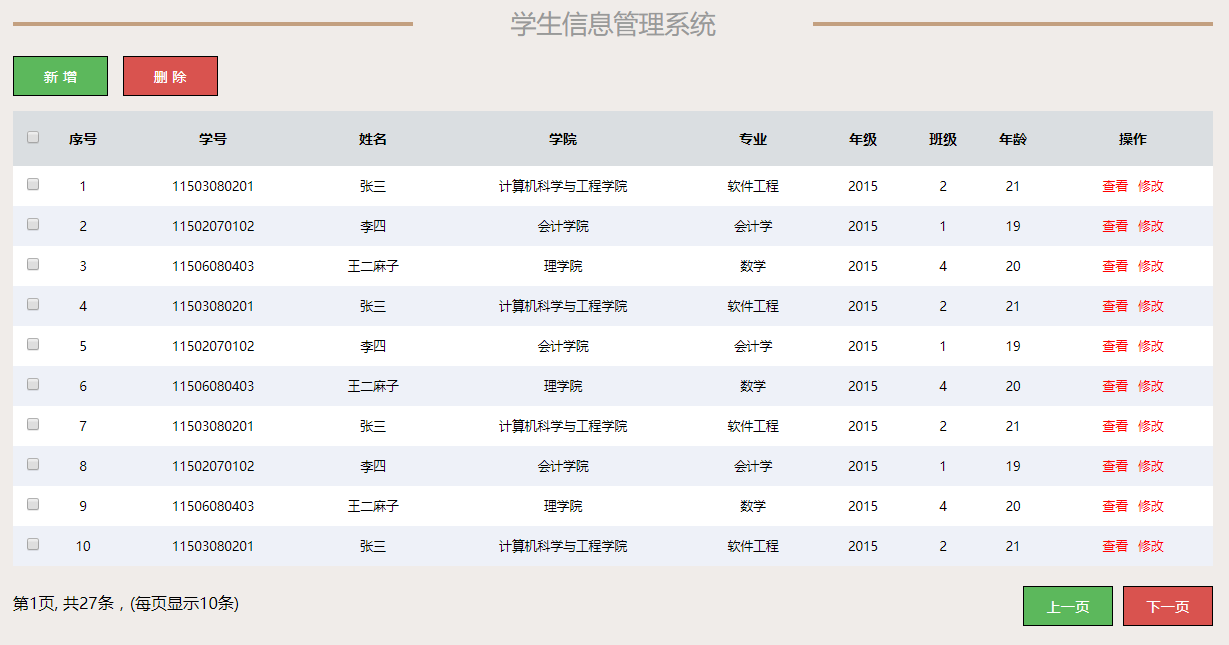
图1 学生信息管理系统主界面
(2)点击“新增”按钮将弹出新窗体,用于录入学生的基本信息。在保存操作时,系统会校验数据的合法性。新增页面效果如图3所示。
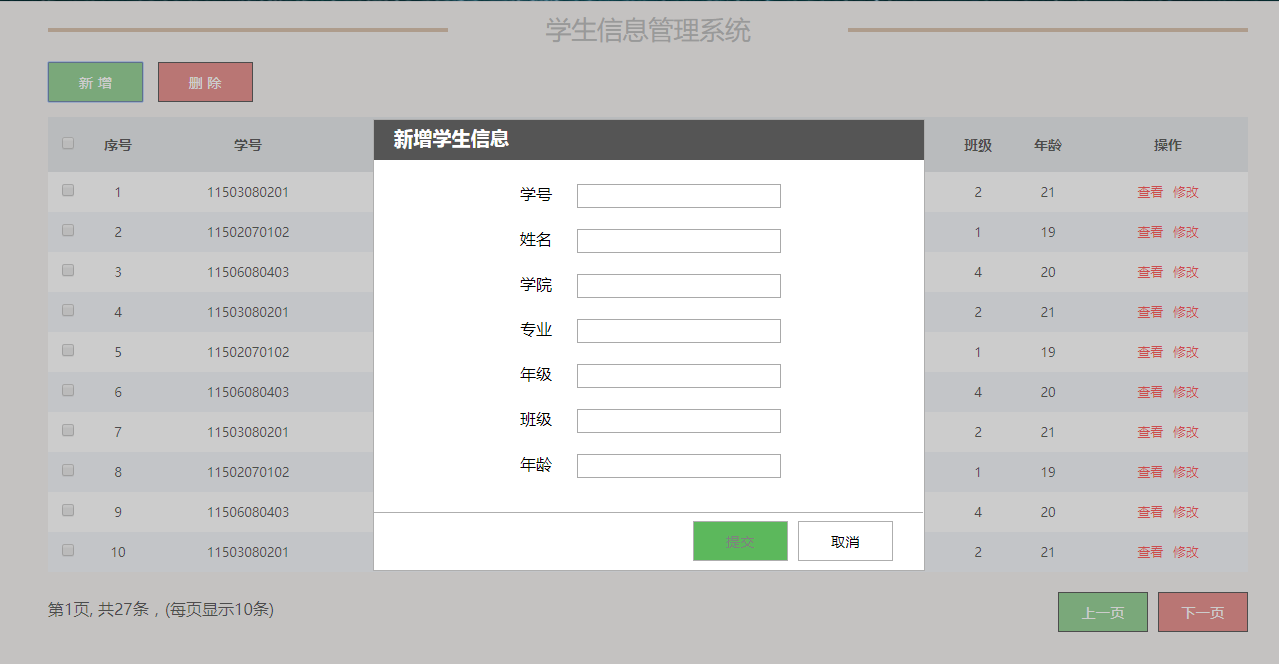
图2 新增界面
(3)点击“修改”按钮将弹出新窗体,允许对当前行的学生信息进行编辑。
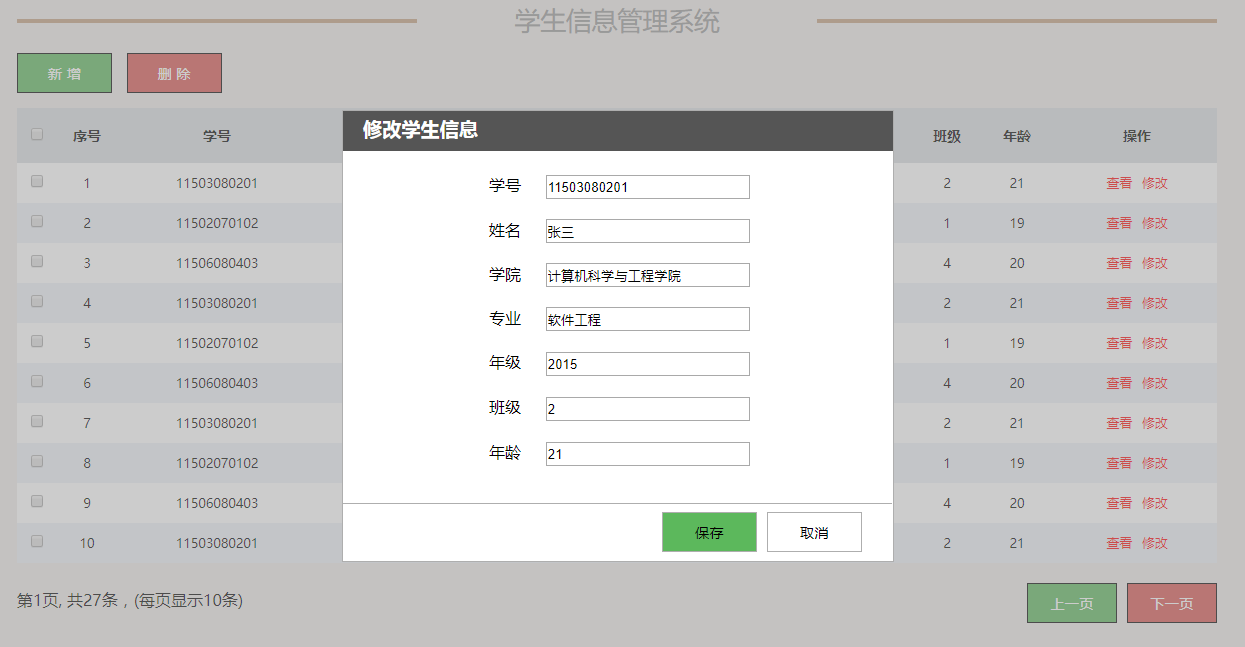
图3 修改界面
(4)点击“查看”按钮将弹出新窗体,展示当前行的学生详细信息。此时,输入框内容设置为只读,不可修改。
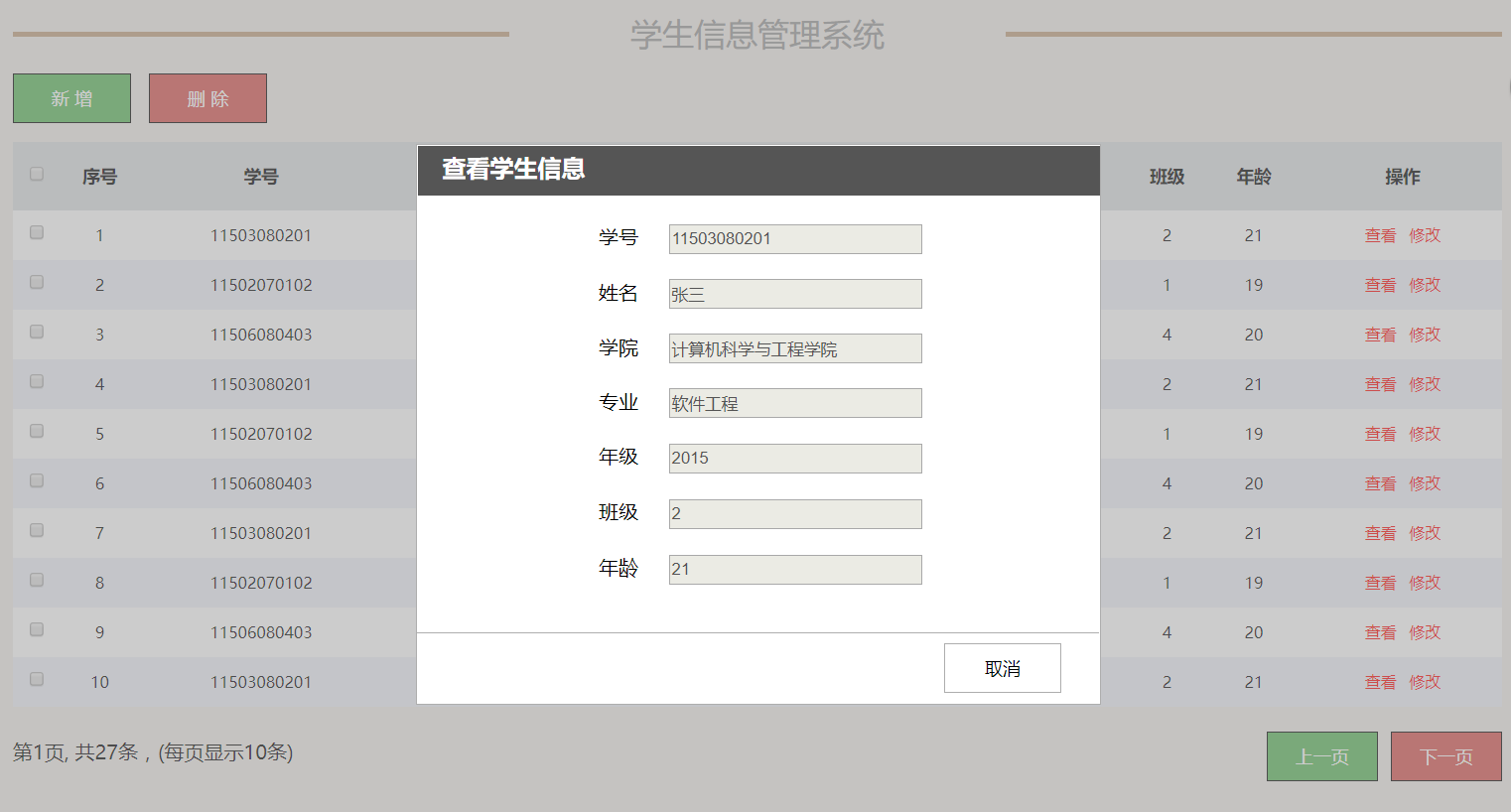
图4 查看
(5)其他功能要求
- 点击“删除”按钮时,系统会弹出确认提示框;若用户选择“是”,则删除当前行数据。支持多选删除,点击“全选”按钮可选择当前页的所有学生记录。
- 表格行采用隔行换色显示,以提升可读性。
- 实现鼠标移入移出行的视觉反馈效果(hover状态)。
- 具备上一页和下一页的分页功能;当无法翻页时,系统会给出相应提示。
- 界面需展示总数据条数、每页显示条数以及当前所在页数。
到此这篇关于JavaScript+HTML实现学生信息管理系统的文章就介绍到这了,更多相关js+html实现学生信息管理系统内容请搜索本站以前的文章或继续浏览下面的相关文章希望大家以后多多支持本站!
JS大数值转字符串出现科学计数法怎么办
2026-11-05 17:09:21
JS split切割后出现空字符串怎么过滤
2026-11-05 16:00:30
在 React 或 Vue 项目中封装使用 JS 节流防抖
2026-11-05 15:27:29
JavaScript中怎么将带小数的字符串转为整数?
2026-11-05 14:32:38
怎么用JavaScript策略模式重构电商促销计算逻辑?
2026-11-05 14:01:09