

JavaScript实现简单加法计算器
作者:小括号时间:2026-10-24 09:15:46浏览:664
本文介绍如何使用JavaScript和HTML构建一个简单的加法计算器。通过获取输入框数值,解析为整数后相加,并将结果显示在页面上。
JavaScript简单计算器实现
本文分享了一段使用JavaScript实现基础计算器功能的代码示例,供读者参考。
具体需求如下:
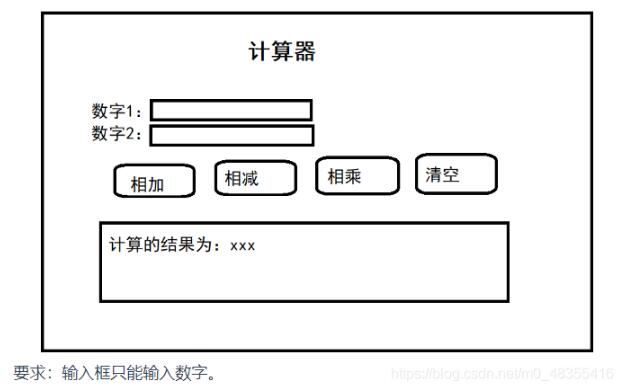
核心实现代码如下:
<html>
<head>
<meta charset="utf-8">
<title>计算器</title>
<script>
function myck(type){
var num1 = document.getElementById("num1");
var num2 = document.getElementById("num2");
if(type==1){
// 计算操作
var result = parseInt(num1.value) + parseInt(num2.value);
alert(result);
document.getElementById("resultDiv").innerText ="最终计算结果:"+ result;
}else if(type==2){
var result = parseInt(num1.value) - parseInt(num2.value);
alert(result);
document.getElementById("resultDiv").innerText ="最终计算结果:"+ result;
}
else if(type==3){
var result = parseInt(num1.value) * parseInt(num2.value);
alert(result);
document.getElementById("resultDiv").innerText ="最终计算结果:"+ result;
}
else if(type==4){
if(confirm("是否正确清空?")){
// 清空
num1.value = "";
num2.value = "";
document.getElementById("resultDiv").innerText="";
}
}
}
</script>
</head>
<body>
<div style="margin-top: 100px;margin-left: 500px;">
<span style="font-size: 60px;">计算器</span>
</div>
<div>
<div class="innerDiv" style="margin-left: 490px;">
数 字1:<input id="num1" type="number" placeholder="请输入数字1">
</div>
</div>
<div>
<div class="innerDiv" style="margin-left:490px;">
数 字2:<input id="num2" type="number" placeholder="请输入数字2">
</div>
</div>
<div>
<div style="margin-left: 500px;" class="innerDiv">
<input type="button" onclick="myck(1)" value="相 加">
<input type="button" onclick="myck(2)" value="相 减">
<input type="button" onclick="myck(3)" value="相 乘">
<input type="button" onclick="myck(4)" value="清 空">
</div>
</div>
<div id="resultDiv">
</div>
</body>
<style>
.innerDiv{
margin-left: 420px;
margin-top: 20px;
}
</style>
</html>希望以上内容对读者的学习有所帮助,感谢支持。
作者最新文章
JS语法错误会阻止加载吗?区分SyntaxError与资源加载失败
2026-11-05 16:08:46
JavaScript常见SyntaxError语法错误排查与修复方法
2026-11-05 13:58:44
JS中slice、substring和substr截取字符串的区别
2026-11-05 13:43:47
JS 转 TS 手动迁移最佳实践:从配置 tsconfig 到消除 any 类型
2026-11-05 11:53:32
为什么JS数组push后得到的是数字而不是数组?
2026-11-05 09:59:18