
JS安全判空:怎么处理可能为null或undefined的字符串变量
使用 == null 或 === null || === undefined 判断变量是否为空,再结合 || '' 提供默认值。避免直接使用 str.length === 0 ,防止 TypeError 。
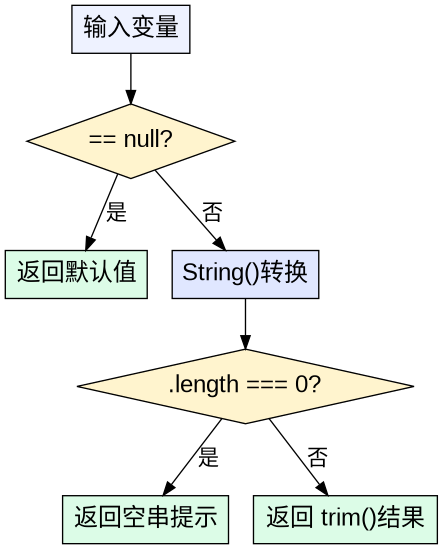
判空逻辑与类型差异
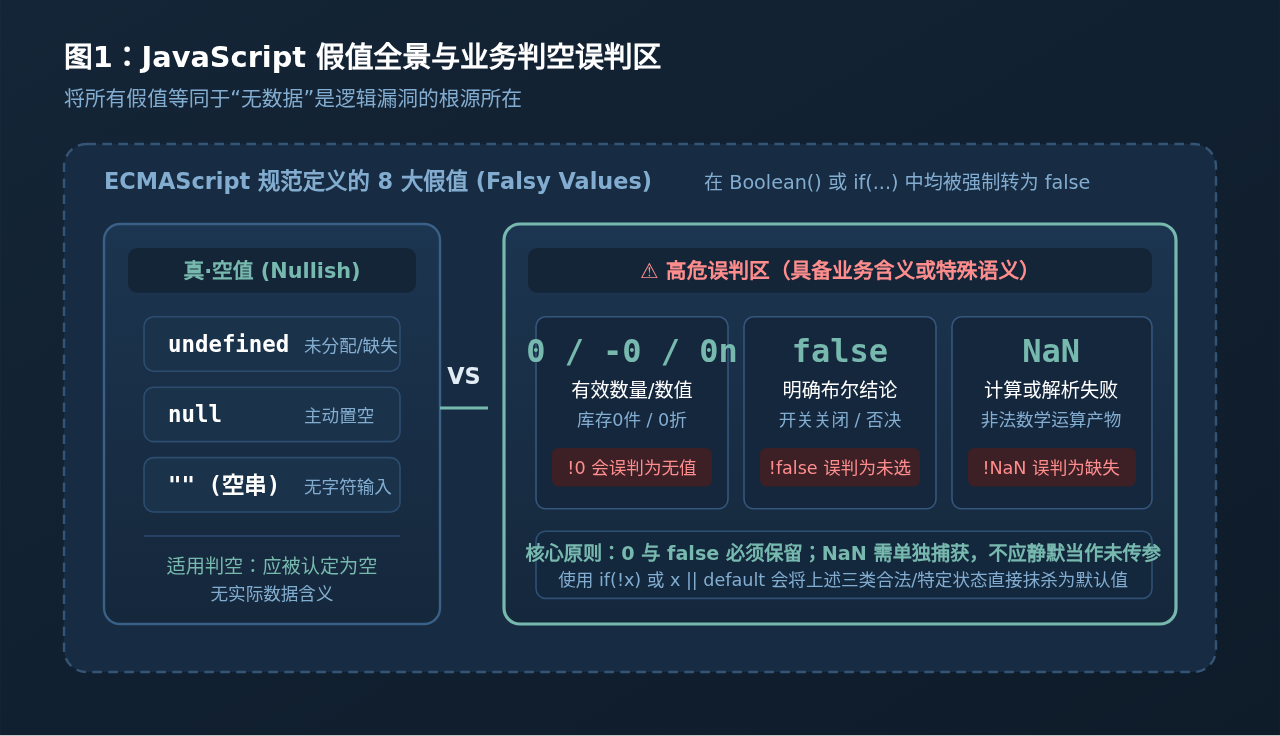
在 JavaScript 中,字符串可能为 null、undefined 或空字符串 ''。直接调用 .length 会在值为 null/undefined 时抛出错误。

== null 会同时匹配 null 和 undefined,是处理可选属性的简洁方式。若需严格区分,应使用 ===。对于字符串内容,需额外检查长度或转为布尔值。
完整安全处理程序
以下代码演示了如何安全地获取字符串值,并处理各种空状态。将代码保存为 safe-null-check.js 并在 Node.js 环境中运行。

function safeGetString(input) {
    // 处理 null 或 undefined
    if (input == null) {
        return 'default_value';
    }

    // 确保是字符串类型
    const str = String(input);

    // 处理空字符串
    if (str.length === 0) {
        return 'empty_string_detected';
    }

    return str.trim();
}

console.log(safeGetString(null));       // default_value
console.log(safeGetString(undefined)); // default_value
console.log(safeGetString(''));        // empty_string_detected
console.log(safeGetString(' hello ')); // hello
运行程序后,前两个输出为 default_value,证明 == null 成功拦截了 null 和 undefined。第三个输出为 empty_string_detected,说明空字符串被单独处理。第四个输出去除了空格。若去掉 if (input == null) 检查,前两次调用将抛出 TypeError。
程序定义了不同输入场景,展示了从报错到正常输出的变化。重点观察当变量为 null 时的分支处理。
空字符串与假值的区别
空字符串 '' 在布尔上下文中为 false,但它不是 null 或 undefined。某些业务逻辑需要区分“未赋值”和“赋值为空”。
沿用上述程序,若输入为 '',== null 判断为假,但 !str 为真。根据需求选择是否将空字符串视为无效输入。
JS中split与match/substring在大规模字符串切割时的性能对比
2026-11-27
Smart Portal 域管理员提权漏洞排查与缓解指南
2026-11-27
思源笔记存储型 XSS 漏洞可经桌面端 Node 集成执行系统命令
2026-11-27
JS防抖与节流实现:高频事件下的延迟执行优化技巧
2026-11-26
OpenSSL 高危 TLS 漏洞预警:三条分支补丁仍待官方核验
2026-11-26